

website_sale) powers a fast-growing share of online stores. The Print.App
module plugs straight into it: your customers design on the product page, and
every confirmed order carries its print-ready files.
The module supports Odoo 17 and 18, self-hosted and on Odoo.sh.
Third-party modules cannot be installed on Odoo Online (the SaaS at odoo.com) —
that edition only runs Odoo’s own apps.
-
Install the module. Two ways:
- From the Odoo Apps Store: download the zip for your Odoo version and extract it into your addons directory.
- From GitHub: clone the repo and copy (or symlink) the
printappfolder into your addons path — use the branch matching your Odoo version (17.0or18.0). On Odoo.sh, add it as a git submodule.
- Restart Odoo, then in the Apps menu click Update Apps List and install Print.App Product Personalizer. (If you don’t see it, remove the default “Apps” filter in the search bar.) Installing it pulls in Odoo’s own eCommerce app automatically if you don’t have it yet.
-
Next, navigate to your Print.App Dashboard and grab your credentials by clicking the button on the left-top corner.
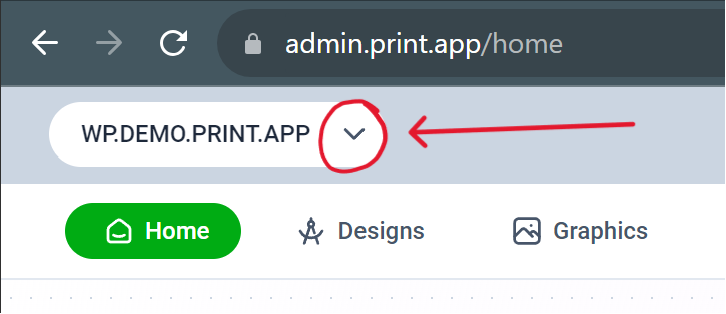
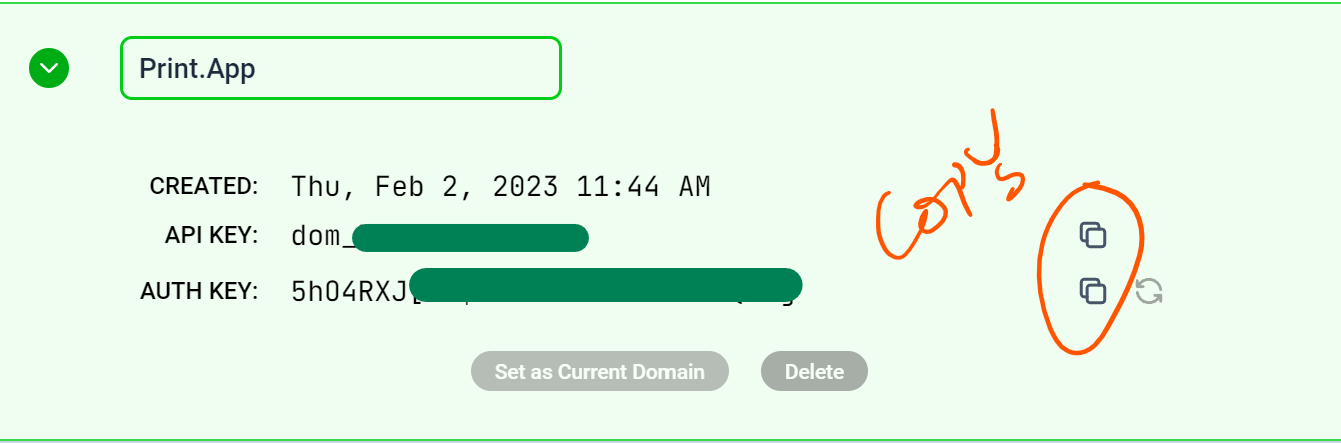
You can still use your credentials for localhost testing if you are not ready to go live just yet. -
In Odoo, go to
Website->Configuration->Settings, scroll to the Print.App section, and paste your Domain Key and Auth Key, then Save. -
Now link a design to a product. Go to
Website->eCommerce->Productsand open a product (or create one). At the end of the tab row you will find the Print.App Design tab — it takes you to the Print.App Design Dashboard with this product pre-selected, where you map a design to it. - You’re all set! Open the product on your store front and check that it shows the Customize button. After a customer saves a design, their previews replace the product images, follow the item into the cart, and the confirmed order links the print-ready files in your backend.
Trouble shooting guide
If you can't see the Customize now button in your product page, please follow these guides:- Ensure you have a price set for the product; if not, the customize button will not show.
- Also ensure that the domain name matches the domain title in Print.App domains
- If still it doesn't show, please reach out to us on our discord community.
Want to see it working before installing anything? Try our live
Odoo demo store.