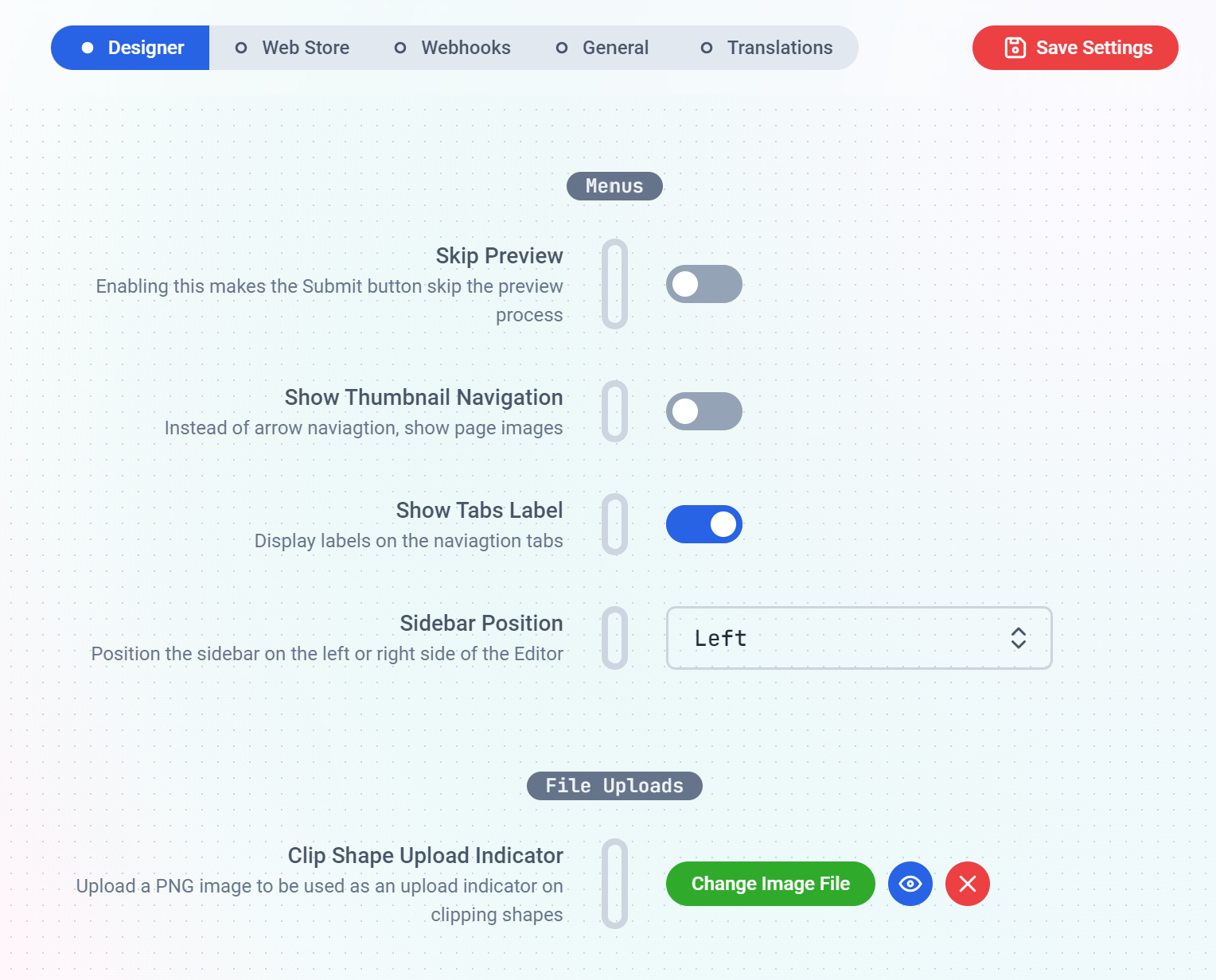
This is where you configure how the Design Editor performs on your store.The Menus sub-section is where you make the editor to Skip previews when a customer clicks the preview button, place the
side bar on the left or right hand side of the window, etc. We have short descriptions against each menu to hint you on what they do.Layout sets how the Design Editor is arranged for your customers across the whole store: the full studio, a
step-by-step flow, or a view-and-approve screen. You can override it for any single design from the Design panel.
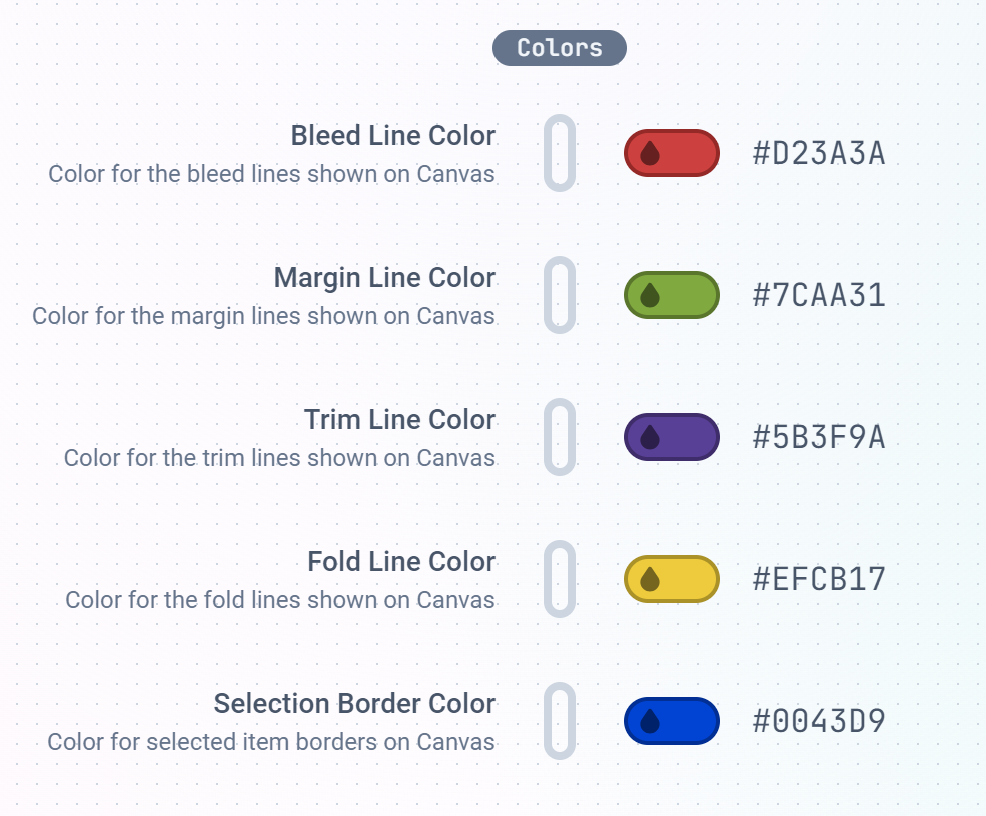
You also get to handle file uploads and the colors of the Designer interface.
Things like Bleed, Margin, Trim, Fold and Border lines color can all be uniquely set here to your taste.
The Text sub-section is where you set the default behaviour of Text elements when placed on the canvas. The default Text
content to show, type of Textbox whether wrapping or expandable text.Auto place New Text when enabled, places the text directly on the canvas when the customer clicks the text button.
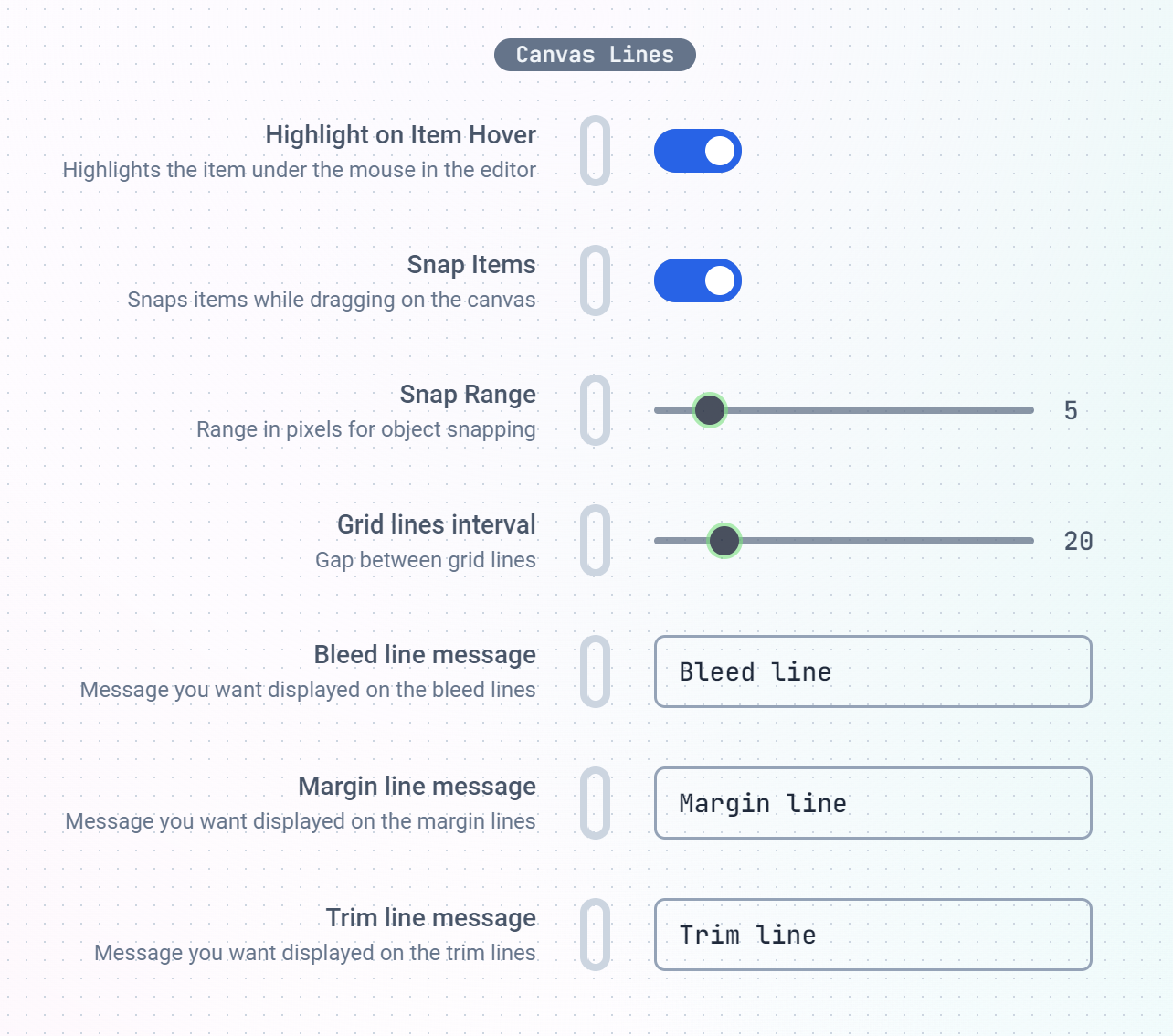
When disabled, the customer needs to click on a specific area on the canvas where they will like the text to be positioned.Canvas Lines are guide lines drawn to aid the customer while designing on the canvas. You can set their behaviours here
as well as guide messages to let the customer know what each line means or represents.
This is where you can set the Snapping range, Grid line intervals, Bleed, Margin and Trim line hints.The Projects sub-section is where you can set the lifetime of customer-created projects as well as enable auto-save feature on the Designer.
Store Settings
Here, you get to configure how the Editor integrates with your WebStore.Enabling the Retain Product Images feature makes the app to NOT swap your product images with the customized
previews when your customer finishes their customization.Force Customization will hide your Add to Cart button until the buyer creates a customization.
If this feature does not work on your store,
it most likely means your store theme is unique and we may need to set the add to cart button selector for your store.
Please do reach out.
To add the product to the cart as soon as the buyer finishes, turn on Add to Cart on Save in the design’s
settings. It works alongside Force Customization and presses the same add to cart
button, so the tip above applies to it too.Display Modes This sets how the editor will display on your store. Currently, we have Full Window, Dialog, Inline and Mini
modes.
You can optionally add your own custom JavaScript or CSS using the corresponding inputs provided.
The script and stylings provided will take effect immediately they are loaded unto your store.
Webhooks
Use the Webhooks to get notified when certain events happen on your store. Currently, we have Project Created and File Uploaded.When a new Project is created or your customers uploads a file, you can provide a URL for us to call and deliver the notification to.This can be used with external services like Zapier or Make to send project files to your Print service provider
or even delivered to you by mail.
This features general settings related to the editor’s look and feel.We have the editor theme: Light, Dark and System presets.
Here, you can also set the Sidebar color and the image displayed on modal popups.
Custom Language Translations
Print.App supports over 80 languages. However, we utilize artificial intellegence (AI) to achieve these translations and
and in some instances, the translations doesn’t sit well with your specific requirements. This is where you can
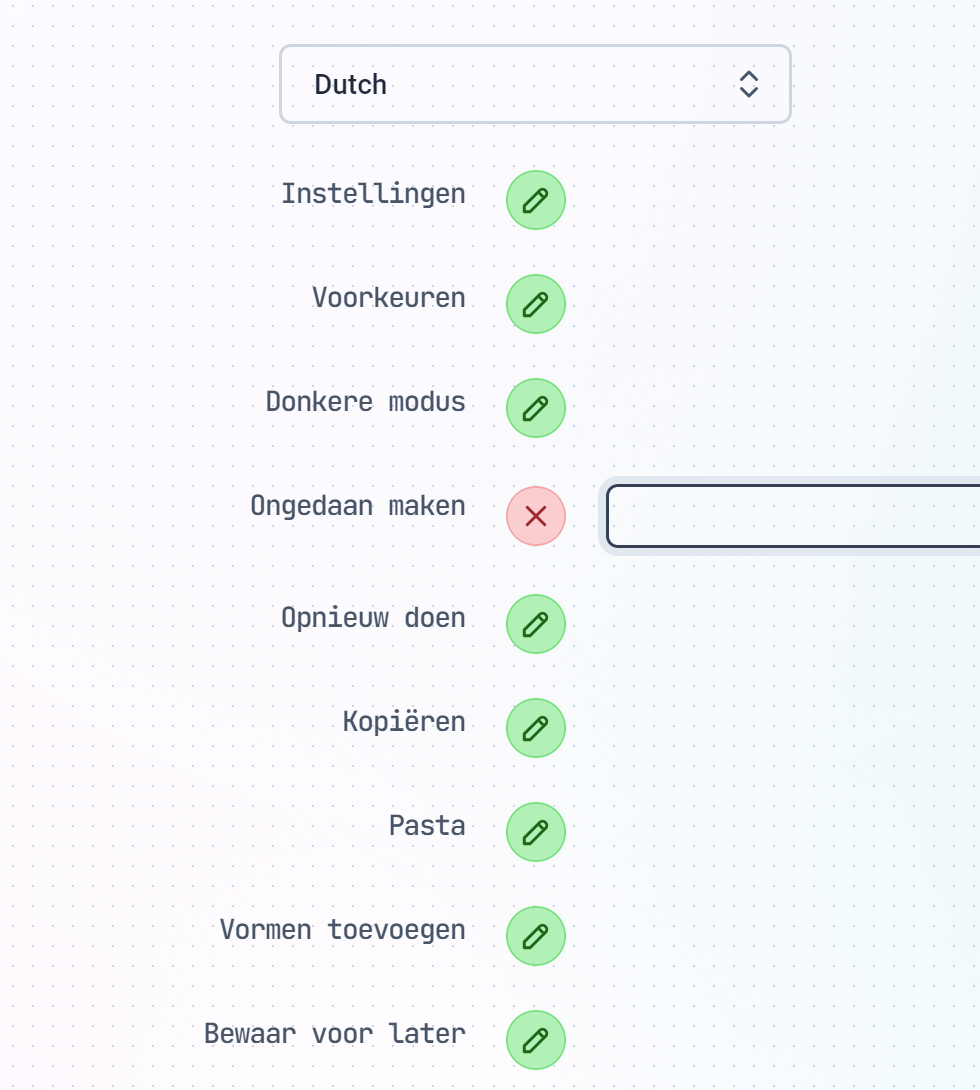
make custom Language Adjustments to all of the texts displayed in the Designer.To make a Custom Translation, simply select the Language from the drop-down list and scroll down to the specific wording you will like to change.
Click the Green Icon button next to it and provide your own unique translation.Save the settings and check your store to see your specific wordings displayed.
{"docsConfig":{"theme":"mint","$schema":"https://mintlify.com/docs.json","name":"Print.App Documentation","colors":{"primary":"#00AC13","light":"#00CD17","dark":"#008B10"},"logo":{"light":"https://mintcdn.com/printapp/8ZfPxlJeGBl6BLAD/logo/light.svg?fit=max\u0026auto=format\u0026n=8ZfPxlJeGBl6BLAD\u0026q=85\u0026s=f2dc8c61d71358f310658fb8b3756287","dark":"https://mintcdn.com/printapp/8ZfPxlJeGBl6BLAD/logo/dark.svg?fit=max\u0026auto=format\u0026n=8ZfPxlJeGBl6BLAD\u0026q=85\u0026s=74402b22cc2694c2d990b57771f9422c"},"favicon":"https://mintcdn.com/printapp/CwAEBcf61sfC7N4Y/favicon.svg?fit=max\u0026auto=format\u0026n=CwAEBcf61sfC7N4Y\u0026q=85\u0026s=cb170a7b273f77e0921c312176e48c99","navbar":{"links":[{"href":"https://discord.gg/XNdtdFxNdE","label":"Community"}],"primary":{"type":"button","label":"Dashboard","href":"https://admin.print.app"}},"footer":{"socials":{"twitter":"https://twitter.com/print_dot_app","instagram":"https://github.com/print_dot_app","github":"https://github.com/printapp","discord":"https://discord.gg/XNdtdFxNdE"}},"styling":{"latex":true},"navigation":{"pages":[]}},"deployment":{"deploymentMetadataValue":{"subdomain":"printapp","hasAudioNarration":false,"actualSubdomain":"printapp","customDomains":["print.app"],"gitSource":{"type":"github","owner":"printapp","repo":"documentation","deployBranch":"main","contentDirectory":"","isPrivate":false,"mountPath":"","label":"","_id":"6aee29ef3dd0f82bef4f9995"},"entitlements":{},"buildId":"6af702e5d091d1e54976cd62","clientVersion":"0.0.4143","searchFilterCounts":[{"language":"default","tag":"API References","count":112},{"language":"default","tag":"Endpoints","count":100},{"language":"default","tag":"Documentation","count":64},{"language":"default","tag":"Design Guides","count":64},{"language":"default","tag":"Designs","count":35},{"language":"default","tag":"Print Options","count":24},{"language":"default","tag":"Platforms","count":18},{"language":"default","tag":"Guides","count":12},{"language":"default","tag":"Gang Sheet Builder","count":12},{"language":"default","tag":"Configuration","count":8}],"searchSettings":{"fullPageSearch":true}},"assistantConfig":{},"basePath":"/docs","hasChatPermissions":false,"hasWebMcpPermissions":false,"toggles":[{"name":"kill-isr","enabled":true,"variant":{"name":"disabled","enabled":false,"feature_enabled":true},"impressionData":false},{"name":"custom-rbac-roles","enabled":true,"variant":{"name":"disabled","enabled":false,"feature_enabled":true},"impressionData":false},{"name":"agent-mintlify-slack","enabled":true,"variant":{"name":"disabled","enabled":false,"feature_enabled":true},"impressionData":false},{"name":"agent-integrations-settings","enabled":true,"variant":{"name":"disabled","enabled":false,"feature_enabled":true},"impressionData":false},{"name":"rbac-expansion","enabled":true,"variant":{"name":"disabled","enabled":false,"feature_enabled":true},"impressionData":false},{"name":"automations-pr-grouping","enabled":true,"variant":{"name":"disabled","enabled":false,"feature_enabled":true},"impressionData":false},{"name":"custom-prefix","enabled":true,"variant":{"name":"disabled","enabled":false,"feature_enabled":true},"impressionData":false},{"name":"analytics-v7","enabled":true,"variant":{"name":"disabled","enabled":false,"feature_enabled":true},"impressionData":false},{"name":"user-flows-analytics","enabled":true,"variant":{"name":"disabled","enabled":false,"feature_enabled":true},"impressionData":false},{"name":"no-publish-flow","enabled":true,"variant":{"name":"disabled","enabled":false,"feature_enabled":true},"impressionData":false},{"name":"workos-onboarding","enabled":true,"variant":{"name":"disabled","enabled":false,"feature_enabled":true},"impressionData":false},{"name":"snapshot-serving-live","enabled":true,"variant":{"name":"disabled","enabled":false,"feature_enabled":true},"impressionData":false},{"name":"stripTemperatureMiddleware","enabled":true,"variant":{"name":"disabled","enabled":false,"feature_enabled":true},"impressionData":false},{"name":"support-platform-pylon-zendesk","enabled":true,"variant":{"name":"disabled","enabled":false,"feature_enabled":true},"impressionData":false},{"name":"snapshot-serving","enabled":true,"variant":{"name":"disabled","enabled":false,"feature_enabled":true},"impressionData":false},{"name":"instant-rollback","enabled":true,"variant":{"name":"disabled","enabled":false,"feature_enabled":true},"impressionData":false},{"name":"granular-notifications-server","enabled":true,"variant":{"name":"disabled","enabled":false,"feature_enabled":true},"impressionData":false},{"name":"granular-notifications","enabled":true,"variant":{"name":"disabled","enabled":false,"feature_enabled":true},"impressionData":false},{"name":"automations-fable","enabled":true,"variant":{"name":"disabled","enabled":false,"feature_enabled":true},"impressionData":false},{"name":"fixed-ai-action-pricing","enabled":true,"variant":{"name":"disabled","enabled":false,"feature_enabled":true},"impressionData":false},{"name":"automation-resolve-merge-conflict","enabled":true,"variant":{"name":"disabled","enabled":false,"feature_enabled":true},"impressionData":false},{"name":"scoped-publishing","enabled":true,"variant":{"name":"disabled","enabled":false,"feature_enabled":true},"impressionData":false},{"name":"mintql","enabled":true,"variant":{"name":"disabled","enabled":false,"feature_enabled":true},"impressionData":false},{"name":"page-level-analytics","enabled":true,"variant":{"name":"disabled","enabled":false,"feature_enabled":true},"impressionData":false},{"name":"editor-version-history-v2","enabled":true,"variant":{"name":"disabled","enabled":false,"feature_enabled":true},"impressionData":false},{"name":"billing-page-v2","enabled":true,"variant":{"name":"disabled","enabled":false,"feature_enabled":true},"impressionData":false},{"name":"full-page-search","enabled":true,"variant":{"name":"disabled","enabled":false,"feature_enabled":true},"impressionData":false},{"name":"workspace-projects","enabled":true,"variant":{"name":"disabled","enabled":false,"feature_enabled":true},"impressionData":false},{"name":"assistant-v5","enabled":true,"variant":{"name":"disabled","enabled":false,"feature_enabled":true},"impressionData":false},{"name":"fork-pr-previews","enabled":true,"variant":{"name":"disabled","enabled":false,"feature_enabled":true},"impressionData":false},{"name":"revalidation-jwt","enabled":true,"variant":{"name":"disabled","enabled":false,"feature_enabled":true},"impressionData":false},{"name":"workos-sso-scim","enabled":true,"variant":{"name":"disabled","enabled":false,"feature_enabled":true},"impressionData":false},{"name":"hobby-abuse-scan","enabled":true,"variant":{"name":"disabled","enabled":false,"feature_enabled":true},"impressionData":false},{"name":"dashboard-inbox","enabled":true,"variant":{"name":"disabled","enabled":false,"feature_enabled":true},"impressionData":false},{"name":"workos-signup","enabled":true,"variant":{"name":"disabled","enabled":false,"feature_enabled":true},"impressionData":false},{"name":"turbopuffer-dual-write","enabled":true,"variant":{"name":"disabled","enabled":false,"feature_enabled":true},"impressionData":false},{"name":"workos-enabled","enabled":true,"variant":{"name":"disabled","enabled":false,"feature_enabled":true},"impressionData":false},{"name":"approve-review-flow","enabled":true,"variant":{"name":"disabled","enabled":false,"feature_enabled":true},"impressionData":false},{"name":"editor-metadata","enabled":true,"variant":{"name":"disabled","enabled":false,"feature_enabled":true},"impressionData":false},{"name":"sso-setup-deadline-banner","enabled":true,"variant":{"name":"disabled","enabled":false,"feature_enabled":true},"impressionData":false},{"name":"turbopuffer-serve","enabled":true,"variant":{"name":"disabled","enabled":false,"feature_enabled":true},"impressionData":false},{"name":"live-agents","enabled":true,"variant":{"name":"disabled","enabled":false,"feature_enabled":true},"impressionData":false},{"name":"llms-txt-v2","enabled":true,"variant":{"name":"disabled","enabled":false,"feature_enabled":true},"impressionData":false}],"googleFontsInlined":false},"customCss":[],"page":{"pagePath":"configuration/settings","slug":"/configuration/settings","pageMetadata":{"title":"Settings","description":"Settings, Configuration and Language translations","href":"/configuration/settings"},"description":{"compiledSource":"\"use strict\";\nconst {jsx: _jsx} = arguments[0];\nconst {useMDXComponents: _provideComponents} = arguments[0];\nfunction _createMdxContent(props) {\n const _components = {\n p: \"p\",\n ..._provideComponents(),\n ...props.components\n };\n return _jsx(_components.p, {\n children: \"Settings, Configuration and Language translations\"\n });\n}\nfunction MDXContent(props = {}) {\n const {wrapper: MDXLayout} = {\n ..._provideComponents(),\n ...props.components\n };\n return MDXLayout ? _jsx(MDXLayout, {\n ...props,\n children: _jsx(_createMdxContent, {\n ...props\n })\n }) : _createMdxContent(props);\n}\nreturn {\n default: MDXContent\n};\n","frontmatter":{},"scope":{}},"pageType":"default","mdx":{"mdxSource":{"compiledSource":"\"use strict\";const{Fragment:_Fragment,jsx:_jsx,jsxs:_jsxs}=arguments[0];const{useMDXComponents:_provideComponents}=arguments[0];function _createMdxContent(props){const _components={a:`a`,li:`li`,p:`p`,strong:`strong`,ul:`ul`,..._provideComponents(),...props.components},{Frame,Heading,OptimizedImage,Tip}=_components;if(!Frame)_missingMdxReference(`Frame`,true);if(!Heading)_missingMdxReference(`Heading`,true);if(!OptimizedImage)_missingMdxReference(`OptimizedImage`,true);if(!Tip)_missingMdxReference(`Tip`,true);return _jsxs(_Fragment,{children:[_jsx(_components.p,{children:`For ease of use, the settings section is divided into five sections:`}),`\n`,_jsxs(_components.ul,{children:[`\n`,_jsx(_components.li,{children:_jsx(_components.a,{href:`#designer-settings`,children:`Designer Settings`})}),`\n`,_jsx(_components.li,{children:_jsx(_components.a,{href:`#store-settings`,children:`Store Settings`})}),`\n`,_jsx(_components.li,{children:_jsx(_components.a,{href:`#webhooks`,children:`Webhooks`})}),`\n`,_jsx(_components.li,{children:_jsx(_components.a,{href:`#general-settings`,children:`General Settings`})}),`\n`,_jsx(_components.li,{children:_jsx(_components.a,{href:`#custom-language-translations`,children:`Custom Language Translations`})}),`\n`]}),`\n`,_jsx(Frame,{children:_jsx(OptimizedImage,{class:`mint-rounded-md`,src:`https://mintcdn.com/printapp/IX5EDu7QSq3aP3fy/images/settings.png?fit=max\u0026auto=format\u0026n=IX5EDu7QSq3aP3fy\u0026q=85\u0026s=5202c1df716e280146598cb6936b6d17`,\"data-og-width\":`1528`,width:`1528`,\"data-og-height\":`1232`,height:`1232`,\"data-path\":`images/settings.png`,\"data-optimize\":`true`,\"data-opv\":`3`,srcset:`https://mintcdn.com/printapp/IX5EDu7QSq3aP3fy/images/settings.png?w=280\u0026fit=max\u0026auto=format\u0026n=IX5EDu7QSq3aP3fy\u0026q=85\u0026s=c53ceae1659d5f63a27e914dd3cc32ab 280w, https://mintcdn.com/printapp/IX5EDu7QSq3aP3fy/images/settings.png?w=560\u0026fit=max\u0026auto=format\u0026n=IX5EDu7QSq3aP3fy\u0026q=85\u0026s=694873bc4c2d36fe3206285e43857c12 560w, https://mintcdn.com/printapp/IX5EDu7QSq3aP3fy/images/settings.png?w=840\u0026fit=max\u0026auto=format\u0026n=IX5EDu7QSq3aP3fy\u0026q=85\u0026s=2322f7bc86cf30e2bc9d268c03996b2f 840w, https://mintcdn.com/printapp/IX5EDu7QSq3aP3fy/images/settings.png?w=1100\u0026fit=max\u0026auto=format\u0026n=IX5EDu7QSq3aP3fy\u0026q=85\u0026s=bfc210bdabfe14a2254fcb03f2011aba 1100w, https://mintcdn.com/printapp/IX5EDu7QSq3aP3fy/images/settings.png?w=1650\u0026fit=max\u0026auto=format\u0026n=IX5EDu7QSq3aP3fy\u0026q=85\u0026s=d988fee35f600ddfcfff02839e3737d7 1650w, https://mintcdn.com/printapp/IX5EDu7QSq3aP3fy/images/settings.png?w=2500\u0026fit=max\u0026auto=format\u0026n=IX5EDu7QSq3aP3fy\u0026q=85\u0026s=3757ff5c1b563d8cbc6c66b5c1f99f8c 2500w`})}),`\n`,_jsx(Heading,{level:`3`,id:`designer-settings`,children:`Designer Settings`}),`\n`,_jsx(_components.p,{children:`This is where you configure how the Design Editor performs on your store.`}),`\n`,_jsxs(_components.p,{children:[_jsx(_components.strong,{children:`The Menus sub-section`}),` is where you make the editor to Skip previews when a customer clicks the preview button, place the\nside bar on the left or right hand side of the window, etc. We have short descriptions against each menu to hint you on what they do.`]}),`\n`,_jsxs(_components.p,{children:[_jsx(_components.strong,{children:`Layout`}),` sets how the Design Editor is arranged for your customers across the whole store: the full studio, a\nstep-by-step flow, or a view-and-approve screen. You can override it for any single design from the Design panel.`]}),`\n`,_jsx(Tip,{children:_jsxs(_components.p,{children:[_jsx(_components.a,{href:`/configuration/layouts`,children:`See the Layouts guide`}),` for a preview of each layout and how to apply it.`]})}),`\n`,_jsxs(_components.p,{children:[`You also get to handle file uploads and the colors of the Designer interface.\nThings like `,_jsx(_components.strong,{children:`Bleed`}),`, `,_jsx(_components.strong,{children:`Margin`}),`, `,_jsx(_components.strong,{children:`Trim`}),`, `,_jsx(_components.strong,{children:`Fold`}),` and `,_jsx(_components.strong,{children:`Border`}),` lines color can all be uniquely set here to your taste.`]}),`\n`,_jsx(Frame,{children:_jsx(OptimizedImage,{class:`mint-rounded-md`,src:`https://mintcdn.com/printapp/IX5EDu7QSq3aP3fy/images/settings-colors.png?fit=max\u0026auto=format\u0026n=IX5EDu7QSq3aP3fy\u0026q=85\u0026s=3140fede77fbb28320bf2a989e07d51b`,\"data-og-width\":`986`,width:`986`,\"data-og-height\":`816`,height:`816`,\"data-path\":`images/settings-colors.png`,\"data-optimize\":`true`,\"data-opv\":`3`,srcset:`https://mintcdn.com/printapp/IX5EDu7QSq3aP3fy/images/settings-colors.png?w=280\u0026fit=max\u0026auto=format\u0026n=IX5EDu7QSq3aP3fy\u0026q=85\u0026s=6a10f5d9012140715154d01ade7d57d9 280w, https://mintcdn.com/printapp/IX5EDu7QSq3aP3fy/images/settings-colors.png?w=560\u0026fit=max\u0026auto=format\u0026n=IX5EDu7QSq3aP3fy\u0026q=85\u0026s=e9185de98805bd7100f908b8fd88e6b8 560w, https://mintcdn.com/printapp/IX5EDu7QSq3aP3fy/images/settings-colors.png?w=840\u0026fit=max\u0026auto=format\u0026n=IX5EDu7QSq3aP3fy\u0026q=85\u0026s=7298be5b1dc6d10faa12750aba0d7032 840w, https://mintcdn.com/printapp/IX5EDu7QSq3aP3fy/images/settings-colors.png?w=1100\u0026fit=max\u0026auto=format\u0026n=IX5EDu7QSq3aP3fy\u0026q=85\u0026s=883bda766f1604c5ac97b417fc339510 1100w, https://mintcdn.com/printapp/IX5EDu7QSq3aP3fy/images/settings-colors.png?w=1650\u0026fit=max\u0026auto=format\u0026n=IX5EDu7QSq3aP3fy\u0026q=85\u0026s=6e39fc1f00ad743201a5f4325faef549 1650w, https://mintcdn.com/printapp/IX5EDu7QSq3aP3fy/images/settings-colors.png?w=2500\u0026fit=max\u0026auto=format\u0026n=IX5EDu7QSq3aP3fy\u0026q=85\u0026s=0d9bbeaa1fa89251b46908a27aabe708 2500w`})}),`\n`,_jsxs(_components.p,{children:[`The `,_jsx(_components.strong,{children:`Text sub-section`}),` is where you set the default behaviour of Text elements when placed on the canvas. The default Text\ncontent to show, type of Textbox whether wrapping or expandable text.`]}),`\n`,_jsxs(_components.p,{children:[_jsx(_components.strong,{children:`Auto place New Text`}),` when enabled, places the text directly on the canvas when the customer clicks the text button.\nWhen disabled, the customer needs to click on a specific area on the canvas where they will like the text to be positioned.`]}),`\n`,_jsxs(_components.p,{children:[_jsx(_components.strong,{children:`Canvas Lines`}),` are guide lines drawn to aid the customer while designing on the canvas. You can set their behaviours here\nas well as guide messages to let the customer know what each line means or represents.`]}),`\n`,_jsx(Frame,{children:_jsx(OptimizedImage,{class:`mint-rounded-md`,src:`https://mintcdn.com/printapp/IX5EDu7QSq3aP3fy/images/settings-lines.png?fit=max\u0026auto=format\u0026n=IX5EDu7QSq3aP3fy\u0026q=85\u0026s=0425d45862a2fbb04d2abdec48aeabd0`,\"data-og-width\":`1284`,width:`1284`,\"data-og-height\":`1134`,height:`1134`,\"data-path\":`images/settings-lines.png`,\"data-optimize\":`true`,\"data-opv\":`3`,srcset:`https://mintcdn.com/printapp/IX5EDu7QSq3aP3fy/images/settings-lines.png?w=280\u0026fit=max\u0026auto=format\u0026n=IX5EDu7QSq3aP3fy\u0026q=85\u0026s=b9b90c8cb8d3d6043c185c7718fa3920 280w, https://mintcdn.com/printapp/IX5EDu7QSq3aP3fy/images/settings-lines.png?w=560\u0026fit=max\u0026auto=format\u0026n=IX5EDu7QSq3aP3fy\u0026q=85\u0026s=cc377a45ea78784dae74efb13cd9aef4 560w, https://mintcdn.com/printapp/IX5EDu7QSq3aP3fy/images/settings-lines.png?w=840\u0026fit=max\u0026auto=format\u0026n=IX5EDu7QSq3aP3fy\u0026q=85\u0026s=ab363bb5acc35aaa0e7ecead004d7e28 840w, https://mintcdn.com/printapp/IX5EDu7QSq3aP3fy/images/settings-lines.png?w=1100\u0026fit=max\u0026auto=format\u0026n=IX5EDu7QSq3aP3fy\u0026q=85\u0026s=ae446c17b7c39e21e99ef7e6e9fc5c83 1100w, https://mintcdn.com/printapp/IX5EDu7QSq3aP3fy/images/settings-lines.png?w=1650\u0026fit=max\u0026auto=format\u0026n=IX5EDu7QSq3aP3fy\u0026q=85\u0026s=00ff59a17131ee8420a5f869426a9340 1650w, https://mintcdn.com/printapp/IX5EDu7QSq3aP3fy/images/settings-lines.png?w=2500\u0026fit=max\u0026auto=format\u0026n=IX5EDu7QSq3aP3fy\u0026q=85\u0026s=cb2fba26c0b8ff24543a4456ace355e8 2500w`})}),`\n`,_jsx(_components.p,{children:`This is where you can set the Snapping range, Grid line intervals, Bleed, Margin and Trim line hints.`}),`\n`,_jsxs(_components.p,{children:[_jsx(_components.strong,{children:`The Projects sub-section`}),` is where you can set the lifetime of customer-created projects as well as enable auto-save feature on the Designer.`]}),`\n`,_jsx(Heading,{level:`3`,id:`store-settings`,children:`Store Settings`}),`\n`,_jsx(_components.p,{children:`Here, you get to configure how the Editor integrates with your WebStore.`}),`\n`,_jsxs(_components.p,{children:[`Enabling the `,_jsx(_components.strong,{children:`Retain Product Images`}),` feature makes the app to NOT swap your product images with the customized\npreviews when your customer finishes their customization.`]}),`\n`,_jsxs(_components.p,{children:[_jsx(_components.strong,{children:`Force Customization`}),` will hide your Add to Cart button until the buyer creates a customization.`]}),`\n`,_jsx(Tip,{children:_jsx(_components.p,{children:`If this feature does not work on your store,\nit most likely means your store theme is unique and we may need to set the add to cart button selector for your store.\nPlease do reach out.`})}),`\n`,_jsxs(_components.p,{children:[`To add the product to the cart as soon as the buyer finishes, turn on `,_jsx(_components.strong,{children:`Add to Cart on Save`}),` in the design’s\n`,_jsx(_components.a,{href:`/guides/designs/design-settings`,children:`settings`}),`. It works alongside Force Customization and presses the same add to cart\nbutton, so the tip above applies to it too.`]}),`\n`,_jsxs(_components.p,{children:[_jsx(_components.strong,{children:`Display Modes`}),` This sets how the editor will display on your store. Currently, we have `,_jsx(_components.strong,{children:`Full Window`}),`, `,_jsx(_components.strong,{children:`Dialog`}),`, `,_jsx(_components.strong,{children:`Inline`}),` and `,_jsx(_components.strong,{children:`Mini`}),`\nmodes.`]}),`\n`,_jsx(Tip,{children:_jsxs(_components.p,{children:[_jsx(_components.a,{href:`/configuration/display-modes`,children:`See the Display Modes guide`}),` for a visual preview of each mode and when to use it.`]})}),`\n`,_jsx(_components.p,{children:`You can optionally add your own custom JavaScript or CSS using the corresponding inputs provided.\nThe script and stylings provided will take effect immediately they are loaded unto your store.`}),`\n`,_jsx(Heading,{level:`3`,id:`webhooks`,children:`Webhooks`}),`\n`,_jsx(_components.p,{children:`Use the Webhooks to get notified when certain events happen on your store. Currently, we have Project Created and File Uploaded.`}),`\n`,_jsx(_components.p,{children:`When a new Project is created or your customers uploads a file, you can provide a URL for us to call and deliver the notification to.`}),`\n`,_jsxs(_components.p,{children:[`This can be used with external services like `,_jsx(_components.a,{href:`https://zapier.com`,children:`Zapier`}),` or `,_jsx(_components.a,{href:`https://make.com`,children:`Make`}),` to send project files to your Print service provider\nor even delivered to you by mail.`]}),`\n`,_jsx(Tip,{children:_jsx(_components.p,{children:_jsx(_components.a,{href:`/configuration/webhooks`,children:`Learn more about Webhooks here`})})}),`\n`,_jsx(Heading,{level:`3`,id:`general-settings`,children:`General Settings`}),`\n`,_jsx(_components.p,{children:`This features general settings related to the editor’s look and feel.`}),`\n`,_jsx(_components.p,{children:`We have the editor theme: Light, Dark and System presets.\nHere, you can also set the Sidebar color and the image displayed on modal popups.`}),`\n`,_jsx(Heading,{level:`3`,id:`custom-language-translations`,children:`Custom Language Translations`}),`\n`,_jsxs(_components.p,{children:[`Print.App supports over `,_jsx(_components.a,{href:`/configuration/specifications/language`,children:`80 languages`}),`. However, we utilize artificial intellegence (AI) to achieve these translations and\nand in some instances, the translations doesn’t sit well with your specific requirements. This is where you can\nmake custom Language Adjustments to all of the texts displayed in the Designer.`]}),`\n`,_jsx(_components.p,{children:`To make a Custom Translation, simply select the Language from the drop-down list and scroll down to the specific wording you will like to change.\nClick the Green Icon button next to it and provide your own unique translation.`}),`\n`,_jsx(_components.p,{children:`Save the settings and check your store to see your specific wordings displayed.`}),`\n`,_jsx(Frame,{children:_jsx(OptimizedImage,{class:`mint-rounded-md`,src:`https://mintcdn.com/printapp/IX5EDu7QSq3aP3fy/images/settings-lang.png?fit=max\u0026auto=format\u0026n=IX5EDu7QSq3aP3fy\u0026q=85\u0026s=b32ca047b752f70b6eb1b1988ed33c72`,\"data-og-width\":`980`,width:`980`,\"data-og-height\":`1090`,height:`1090`,\"data-path\":`images/settings-lang.png`,\"data-optimize\":`true`,\"data-opv\":`3`,srcset:`https://mintcdn.com/printapp/IX5EDu7QSq3aP3fy/images/settings-lang.png?w=280\u0026fit=max\u0026auto=format\u0026n=IX5EDu7QSq3aP3fy\u0026q=85\u0026s=79648411f5b99a53ba625e4e86c42878 280w, https://mintcdn.com/printapp/IX5EDu7QSq3aP3fy/images/settings-lang.png?w=560\u0026fit=max\u0026auto=format\u0026n=IX5EDu7QSq3aP3fy\u0026q=85\u0026s=807ab84374161f1ebf484c95786c1cd8 560w, https://mintcdn.com/printapp/IX5EDu7QSq3aP3fy/images/settings-lang.png?w=840\u0026fit=max\u0026auto=format\u0026n=IX5EDu7QSq3aP3fy\u0026q=85\u0026s=8600d93f54cd90929bebc9adc5b23f4d 840w, https://mintcdn.com/printapp/IX5EDu7QSq3aP3fy/images/settings-lang.png?w=1100\u0026fit=max\u0026auto=format\u0026n=IX5EDu7QSq3aP3fy\u0026q=85\u0026s=d403ce526c1ca7eef2a83a9a93ea2020 1100w, https://mintcdn.com/printapp/IX5EDu7QSq3aP3fy/images/settings-lang.png?w=1650\u0026fit=max\u0026auto=format\u0026n=IX5EDu7QSq3aP3fy\u0026q=85\u0026s=9fd08a3f8ef005cacc6ce8c553f36c3a 1650w, https://mintcdn.com/printapp/IX5EDu7QSq3aP3fy/images/settings-lang.png?w=2500\u0026fit=max\u0026auto=format\u0026n=IX5EDu7QSq3aP3fy\u0026q=85\u0026s=6a369bbaae8aeb355db43dcffbfd0a2c 2500w`})})]})}function MDXContent(props={}){const{wrapper:MDXLayout}={..._provideComponents(),...props.components};return MDXLayout?_jsx(MDXLayout,{...props,children:_jsx(_createMdxContent,{...props})}):_createMdxContent(props)}return{default:MDXContent};function _missingMdxReference(id,component){throw new Error(`Expected `+(component?`component`:`object`)+\" `\"+id+\"` to be defined: you likely forgot to import, pass, or provide it.\")}","frontmatter":{},"scope":{"config":{},"pageMetadata":{"title":"Settings","description":"Settings, Configuration and Language translations","href":"/configuration/settings"}}},"mdxSourceWithNoJs":null},"mdxExtracts":{"tableOfContents":[{"title":"Designer Settings","slug":"designer-settings","depth":3,"children":[]},{"title":"Store Settings","slug":"store-settings","depth":3,"children":[]},{"title":"Webhooks","slug":"webhooks","depth":3,"children":[]},{"title":"General Settings","slug":"general-settings","depth":3,"children":[]},{"title":"Custom Language Translations","slug":"custom-language-translations","depth":3,"children":[]}],"codeExamples":{}},"jsLinks":["/docs/_mintlify/custom/printapp/5668d2dd18a12f25/ga-consent.js"],"dynamicCss":".mint-rounded-md {\n border-radius: 0.375rem\n}","subdomain":"printapp","siteName":"Print.App Documentation","title":"Settings - Print.App Documentation","navMaps":{"firstHrefInVersion":{},"firstHrefInLanguage":{}},"lastModified":"2026-10-05T11:53:02.218Z","originalFileLocation":"configuration/settings.mdx"},"headHtml":"\u003cscript data-mint-head>(function(){var d=document.documentElement,p=null;if(!p){try{p=localStorage.getItem(\"isDarkMode\")}catch(e){}if(p==='true')p='dark';else if(p==='false')p='light';if(p!=='light'\u0026\u0026p!=='dark'\u0026\u0026p!=='system')p=\"system\"}var r=p==='system'?(matchMedia(\"(prefers-color-scheme: dark)\").matches?'dark':'light'):p;d.classList.remove(r==='dark'?'light':'dark');d.classList.add(r);d.setAttribute(\"data-theme-preference\",p)})();\u003c/script>\u003cmeta data-mint-head name=\"description\" content=\"Settings, Configuration and Language translations\">\u003cmeta data-mint-head name=\"application-name\" content=\"Print.App Documentation\">\u003cmeta data-mint-head name=\"generator\" content=\"Mintlify\">\u003clink data-mint-head rel=\"icon\" type=\"image/png\" sizes=\"192x192\" href=\"/docs/mintlify-assets/_mintlify/favicons/printapp/QZ41IcGsgV91EEVQ/_generated/favicon/android-chrome-192x192.png\" media=\"(prefers-color-scheme: light)\">\u003clink data-mint-head rel=\"apple-touch-icon\" type=\"image/png\" sizes=\"180x180\" href=\"/docs/mintlify-assets/_mintlify/favicons/printapp/QZ41IcGsgV91EEVQ/_generated/favicon/apple-touch-icon.png\">\u003clink data-mint-head rel=\"icon\" type=\"image/png\" sizes=\"16x16\" href=\"/docs/mintlify-assets/_mintlify/favicons/printapp/QZ41IcGsgV91EEVQ/_generated/favicon/favicon-16x16.png\" media=\"(prefers-color-scheme: light)\">\u003clink data-mint-head rel=\"icon\" type=\"image/png\" sizes=\"32x32\" href=\"/docs/mintlify-assets/_mintlify/favicons/printapp/QZ41IcGsgV91EEVQ/_generated/favicon/favicon-32x32.png\" media=\"(prefers-color-scheme: light)\">\u003clink data-mint-head rel=\"shortcut icon\" type=\"image/x-icon\" href=\"/docs/mintlify-assets/_mintlify/favicons/printapp/QZ41IcGsgV91EEVQ/_generated/favicon/favicon.ico\" media=\"(prefers-color-scheme: light)\">\u003clink data-mint-head rel=\"icon\" type=\"image/png\" sizes=\"192x192\" href=\"/docs/mintlify-assets/_mintlify/favicons/printapp/QZ41IcGsgV91EEVQ/_generated/favicon-dark/android-chrome-192x192.png\" media=\"(prefers-color-scheme: dark)\">\u003clink data-mint-head rel=\"icon\" type=\"image/png\" sizes=\"16x16\" href=\"/docs/mintlify-assets/_mintlify/favicons/printapp/QZ41IcGsgV91EEVQ/_generated/favicon-dark/favicon-16x16.png\" media=\"(prefers-color-scheme: dark)\">\u003clink data-mint-head rel=\"icon\" type=\"image/png\" sizes=\"32x32\" href=\"/docs/mintlify-assets/_mintlify/favicons/printapp/QZ41IcGsgV91EEVQ/_generated/favicon-dark/favicon-32x32.png\" media=\"(prefers-color-scheme: dark)\">\u003clink data-mint-head rel=\"shortcut icon\" type=\"image/x-icon\" href=\"/docs/mintlify-assets/_mintlify/favicons/printapp/QZ41IcGsgV91EEVQ/_generated/favicon-dark/favicon.ico\" media=\"(prefers-color-scheme: dark)\">\u003cmeta data-mint-head property=\"og:title\" content=\"Settings - Print.App Documentation\">\u003cmeta data-mint-head property=\"og:description\" content=\"Settings, Configuration and Language translations\">\u003cmeta data-mint-head property=\"og:site_name\" content=\"Print.App Documentation\">\u003cmeta data-mint-head property=\"og:url\" content=\"https://print.app/docs/configuration/settings\">\u003cmeta data-mint-head property=\"og:type\" content=\"website\">\u003cmeta data-mint-head property=\"og:image\" content=\"https://printapp.mintlify.site/docs/_mintlify/api/og/v2?division=Configuration\u0026amp;title=Settings\u0026amp;description=Settings%2C+Configuration+and+Language+translations\u0026amp;theme=634763f1f287d389464516ed\u0026amp;signature=87d8ef70d0344a164f7696fababc8f3e5cfe6975106ef2ace4777fcc48977083\">\u003cmeta data-mint-head property=\"og:image:width\" content=\"1200\">\u003cmeta data-mint-head property=\"og:image:height\" content=\"630\">\u003cmeta data-mint-head name=\"twitter:card\" content=\"summary_large_image\">\u003cmeta data-mint-head name=\"twitter:title\" content=\"Settings - Print.App Documentation\">\u003cmeta data-mint-head name=\"twitter:description\" content=\"Settings, Configuration and Language translations\">\u003cmeta data-mint-head name=\"twitter:image\" content=\"https://printapp.mintlify.site/docs/_mintlify/api/og/v2?division=Configuration\u0026amp;title=Settings\u0026amp;description=Settings%2C+Configuration+and+Language+translations\u0026amp;theme=634763f1f287d389464516ed\u0026amp;signature=87d8ef70d0344a164f7696fababc8f3e5cfe6975106ef2ace4777fcc48977083\">\u003cmeta data-mint-head name=\"twitter:image:width\" content=\"1200\">\u003cmeta data-mint-head name=\"twitter:image:height\" content=\"630\">\u003cmeta data-mint-head name=\"msapplication-config\" content=\"/docs/mintlify-assets/_mintlify/favicons/printapp/QZ41IcGsgV91EEVQ/_generated/favicon/browserconfig.xml\">\u003cmeta data-mint-head name=\"apple-mobile-web-app-title\" content=\"Print.App Documentation\">\u003cmeta data-mint-head name=\"msapplication-TileColor\" content=\"#00AC13\">\u003clink data-mint-head rel=\"canonical\" href=\"https://print.app/docs/configuration/settings\">\u003clink data-mint-head rel=\"alternate\" type=\"application/xml\" href=\"/docs/sitemap.xml\">\u003clink data-mint-head rel=\"alternate\" type=\"text/markdown\" href=\"/docs/configuration/settings.md\">\u003cscript data-mint-head type=\"application/ld+json\">{\"@context\":\"https://schema.org\",\"@graph\":[{\"@type\":\"Organization\",\"@id\":\"https://print.app/#organization\",\"name\":\"Print.App Documentation\",\"url\":\"https://print.app\",\"logo\":{\"@type\":\"ImageObject\",\"url\":\"https://mintcdn.com/printapp/8ZfPxlJeGBl6BLAD/logo/light.svg?fit=max\u0026auto=format\u0026n=8ZfPxlJeGBl6BLAD\u0026q=85\u0026s=f2dc8c61d71358f310658fb8b3756287\"}},{\"@type\":\"WebSite\",\"@id\":\"https://print.app/docs#website\",\"name\":\"Print.App Documentation\",\"url\":\"https://print.app/docs\",\"publisher\":{\"@id\":\"https://print.app/#organization\"}},{\"@type\":\"WebPage\",\"@id\":\"https://print.app/docs/configuration/settings#webpage\",\"url\":\"https://print.app/docs/configuration/settings\",\"name\":\"Settings\",\"description\":\"Settings, Configuration and Language translations\",\"dateModified\":\"2026-10-05T11:53:02.218Z\",\"isPartOf\":{\"@id\":\"https://print.app/docs#website\"},\"breadcrumb\":{\"@id\":\"https://print.app/docs/configuration/settings#breadcrumb\"}},{\"@type\":\"BreadcrumbList\",\"@id\":\"https://print.app/docs/configuration/settings#breadcrumb\",\"itemListElement\":[{\"@type\":\"ListItem\",\"position\":1,\"name\":\"Configuration\",\"item\":\"https://print.app/docs/configuration/editor/editor\"},{\"@type\":\"ListItem\",\"position\":2,\"name\":\"Settings\",\"item\":\"https://print.app/docs/configuration/settings\"}]},{\"@type\":[\"Article\",\"TechArticle\"],\"@id\":\"https://print.app/docs/configuration/settings#article\",\"headline\":\"Settings\",\"name\":\"Settings\",\"description\":\"Settings, Configuration and Language translations\",\"url\":\"https://print.app/docs/configuration/settings\",\"mainEntityOfPage\":{\"@id\":\"https://print.app/docs/configuration/settings#webpage\"},\"dateModified\":\"2026-10-05T11:53:02.218Z\",\"publisher\":{\"@id\":\"https://print.app/#organization\"},\"isPartOf\":{\"@id\":\"https://print.app/docs#website\"}}]}\u003c/script>\u003cscript data-mint-head type=\"application/ld+json\">{\"@context\":\"https://schema.org\",\"@type\":\"WebSite\",\"name\":\"Print.App Documentation\",\"publisher\":{\"@type\":\"Organization\",\"name\":\"Print.App Documentation\"},\"provider\":{\"@type\":\"Organization\",\"name\":\"Mintlify\",\"url\":\"https://mintlify.com\"}}\u003c/script>","agentPointerHref":"/docs/configuration/settings.md","siteName":"Print.App Documentation","nav":{"global":null,"tabs":[{"tab":"Documentation","groups":[{"group":"Getting Started","pages":[{"title":"Introduction","href":"/introduction"},{"title":"FAQs","href":"/faqs"},{"title":"Installation","href":"/installation"}]},{"group":"AI agents","pages":[{"title":"MCP server","href":"/mcp/server"},{"title":"Quickstart for agents","href":"/mcp/quickstart-agents"},{"title":"Set up connectors with AI","href":"/mcp/connectors"},{"title":"Set up Print Options with AI","href":"/mcp/print-options"}]},{"group":"Configuration","pages":[{"title":"Design Editor","description":"Editor sections, features, tips and capabilities","href":"/configuration/editor/editor"},{"title":"Settings","href":"/configuration/settings"},{"title":"Display Modes","description":"How the Design Editor presents itself on your product pages","href":"/configuration/display-modes"},{"title":"Layouts","href":"/configuration/layouts"},{"title":"Webhooks","href":"/configuration/webhooks"},{"title":"Connectors","href":"/configuration/connectors"},{"group":"Specifications","pages":[{"title":"Supported File Types","href":"/configuration/specifications/files"},{"title":"Supported Languages","href":"/configuration/specifications/language"}]}]},{"group":"Platforms","pages":[{"group":"Shopify","pages":[{"title":"Installation","href":"/platforms/shopify/installation"},{"title":"Saved Designs \u0026 Re-orders","href":"/platforms/shopify/saved-designs"}]},{"group":"Wordpress","pages":[{"title":"Installation","href":"/platforms/wordpress/installation"},{"title":"Wordpress demo store","href":"/platforms/wordpress/demo-store"},{"title":null,"href":"/platforms/wordpress/how-to-access-files"}]},{"group":"Prestashop","pages":[{"title":"Installation","href":"/platforms/prestashop/installation"},{"title":null,"href":"/platforms/prestashop/demo-store"},{"title":null,"href":"/platforms/prestashop/how-to-access-files"}]},{"group":"OpenCart","pages":[{"title":"Installation","href":"/platforms/opencart/installation"},{"title":null,"href":"/platforms/opencart/demo-store"},{"title":null,"href":"/platforms/opencart/how-to-access-files"}]},{"group":"Odoo","pages":[{"title":"Installation","href":"/platforms/odoo/installation"},{"title":"Odoo demo store","href":"/platforms/odoo/demo-store"},{"title":null,"href":"/platforms/odoo/how-to-access-files"}]},{"group":"Shopware","pages":[{"title":"Installation","href":"/platforms/shopware/installation"},{"title":"Shopware demo store","href":"/platforms/shopware/demo-store"},{"title":null,"href":"/platforms/shopware/how-to-access-files"}]},{"title":"Platform Features","href":"/platforms/platform-features"}]},{"group":"Print Options","pages":[{"title":"What is Print Options","href":"/print-options/introduction"},{"group":"Getting Started","pages":[{"title":"Shopify","href":"/print-options/shopify"},{"title":"Wordpress","href":"/print-options/wordpress"}]},{"group":"Guides","pages":[{"title":"Option sets \u0026 templates","href":"/print-options/guides/option-sets"},{"title":"Pricing","href":"/print-options/guides/pricing"},{"title":"Pricing by formula","href":"/print-options/guides/formula-pricing"},{"title":"Fields \u0026 choices","href":"/print-options/guides/fields"},{"title":"Quantities \u0026 size runs","href":"/print-options/guides/quantities"},{"title":"Artwork uploads","href":"/print-options/guides/uploads"},{"title":"Cart \u0026 orders","href":"/print-options/guides/cart-and-orders"},{"title":"Languages, prices \u0026 tax","href":"/print-options/guides/languages-and-tax"},{"title":"Appearance","href":"/print-options/guides/appearance"}]},{"group":"Developers","pages":[{"title":"Page API","href":"/print-options/developers/page-api"},{"title":"Option set JSON","href":"/print-options/developers/option-set-json"}]},{"title":"FAQs","href":"/print-options/faqs"}]},{"group":"Gang Sheet Builder","pages":[{"title":"What is the Gang Sheet Builder","href":"/gangsheet/introduction"},{"title":"Getting started","href":"/gangsheet/getting-started"},{"title":"Configuration","href":"/gangsheet/configuration"},{"title":"Pricing","href":"/gangsheet/pricing"},{"title":"The customer flow","href":"/gangsheet/customer-flow"},{"title":"Design tools","href":"/gangsheet/design-tools"},{"title":"Output and production","href":"/gangsheet/output"},{"group":"Tutorials","pages":[{"title":"Tutorial: a Shopify gang sheet with Print Options","href":"/gangsheet/tutorials/shopify-gang-sheet"},{"title":"Tutorial: transfers by size on WooCommerce","href":"/gangsheet/tutorials/woocommerce-transfers-by-size"},{"title":"Tutorial: pricing through the theme","href":"/gangsheet/tutorials/theme-pricing"}]},{"title":"Developers","href":"/gangsheet/developers"},{"title":"FAQs and troubleshooting","href":"/gangsheet/faqs"}]},{"group":"Template Studio","pages":[{"title":"What is Template Studio","href":"/template-studio/introduction"},{"title":"Creating designs","href":"/template-studio/creating-designs"},{"title":"Pricing","href":"/template-studio/pricing"},{"title":"FAQs","href":"/template-studio/faqs"}]}]},{"tab":"Design Guides","pages":[{"title":"Design Guides","href":"/guides/designs/about-designs"}]},{"tab":"API References","pages":[{"title":"API References","href":"/api-reference/v2/introduction"}]}]},"basePath":"","title":"Settings - Print.App Documentation","buildId":"dpl_Aw98ji4XvBsgtZwL1VrkUF9ehFqz","deploymentId":"dpl_Aw98ji4XvBsgtZwL1VrkUF9ehFqz","dynamics":["07c022d89b","a74be98ba7"],"chunks":["Frame-0domioUa.js","DynamicMarkdown-BcGRTrw6.js","zoom-image-lightbox-DsiWwPWR.js","lightbox-handle-r17bVUz3.js"]}