Print.App comes with all the features you will need to accurately translate your color intentions from screen all the way through the PDF files to your print equipments.By default, colors are provided in substractive RBG mode which are dynamically converted to additive CMYK in the final PDF file through the use of ICC color profiles.
You can optionally specify explicit your CMYK output values against any color or gradient with option for naming (SPOT COLOR)
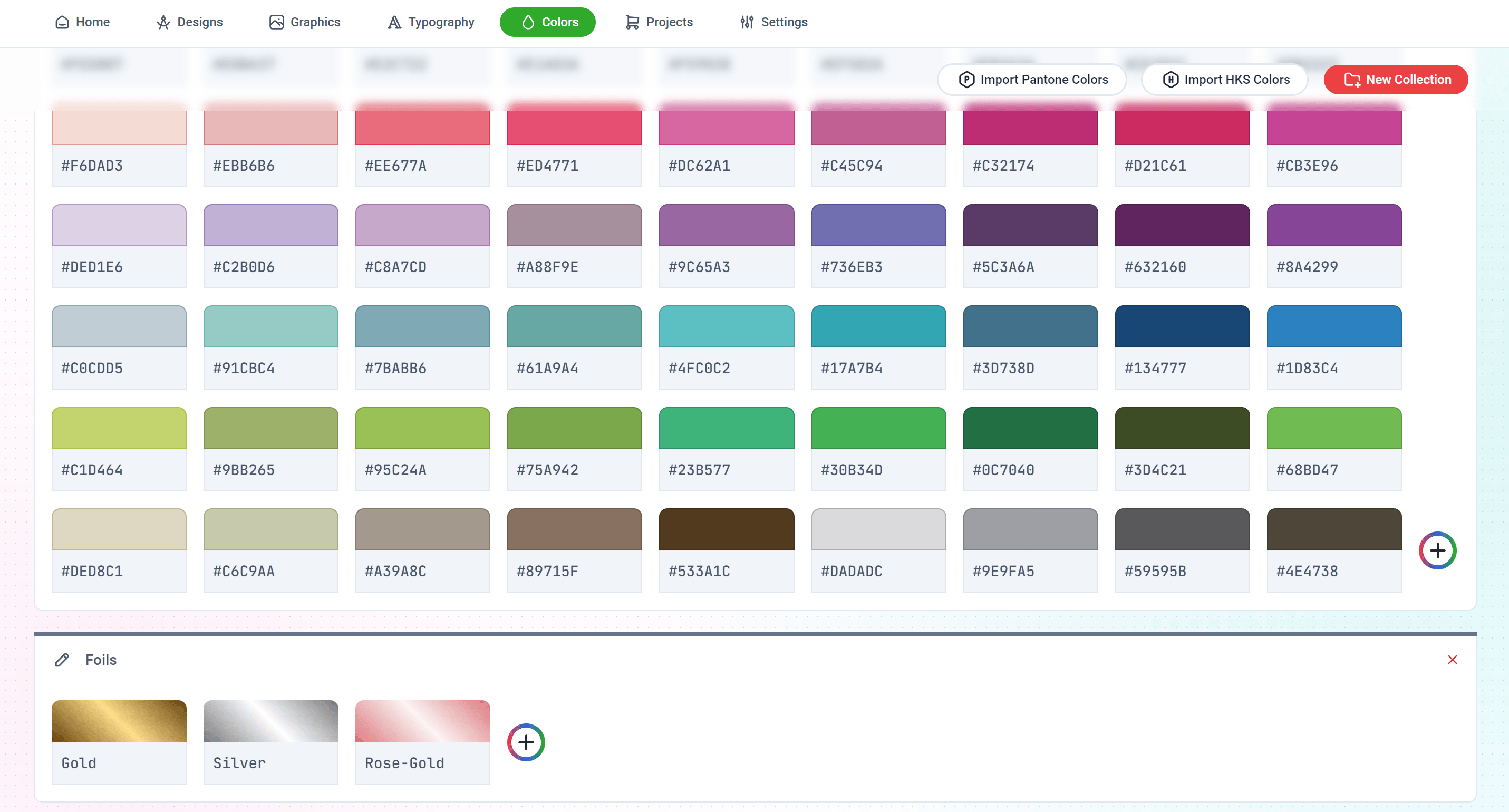
Colors are created and managed in a dedicated Colors Page in the Print.App AdminHere, you can create folders to categorize colors into collections that you can later assign to select designs or by default, load them all into your design Editor.To create a new color collection, simply click on the New Collection button and provide a title.
Then you can start adding colors by clicking the Plus Icon in the folder.
Colors are automatically saved, so be careful here 😉
You can create a Solid Color, Linear Gradient or Radial Gradient colors.In gradient mode, double clicking the color bar will add a new color stop to the strip.
When you click the CMYK multi-colored icon, you can override the color conversion and specify an explict CMYK color and name it a SPOT COLOR. That is the color the item will appear in the final PDF file.
You can create a Resource Profile to assign certain colors to a Design Template. This way, only the colors you’ve selected will be available for use in that Design Template.Read more here
{"docsConfig":{"theme":"mint","$schema":"https://mintlify.com/docs.json","name":"Print.App Documentation","colors":{"primary":"#00AC13","light":"#00CD17","dark":"#008B10"},"logo":{"light":"https://mintcdn.com/printapp/8ZfPxlJeGBl6BLAD/logo/light.svg?fit=max\u0026auto=format\u0026n=8ZfPxlJeGBl6BLAD\u0026q=85\u0026s=f2dc8c61d71358f310658fb8b3756287","dark":"https://mintcdn.com/printapp/8ZfPxlJeGBl6BLAD/logo/dark.svg?fit=max\u0026auto=format\u0026n=8ZfPxlJeGBl6BLAD\u0026q=85\u0026s=74402b22cc2694c2d990b57771f9422c"},"favicon":"https://mintcdn.com/printapp/CwAEBcf61sfC7N4Y/favicon.svg?fit=max\u0026auto=format\u0026n=CwAEBcf61sfC7N4Y\u0026q=85\u0026s=cb170a7b273f77e0921c312176e48c99","navbar":{"links":[{"href":"https://discord.gg/XNdtdFxNdE","label":"Community"}],"primary":{"type":"button","label":"Dashboard","href":"https://admin.print.app"}},"footer":{"socials":{"twitter":"https://twitter.com/print_dot_app","instagram":"https://github.com/print_dot_app","github":"https://github.com/printapp","discord":"https://discord.gg/XNdtdFxNdE"}},"styling":{"latex":true},"navigation":{"pages":[]}},"deployment":{"deploymentMetadataValue":{"subdomain":"printapp","hasAudioNarration":false,"actualSubdomain":"printapp","customDomains":["print.app"],"gitSource":{"type":"github","owner":"printapp","repo":"documentation","deployBranch":"main","contentDirectory":"","isPrivate":false,"mountPath":"","label":"","_id":"6aee29ef3dd0f82bef4f9995"},"entitlements":{},"buildId":"6af702e5d091d1e54976cd62","clientVersion":"0.0.4143","searchFilterCounts":[{"language":"default","tag":"API References","count":112},{"language":"default","tag":"Endpoints","count":100},{"language":"default","tag":"Documentation","count":64},{"language":"default","tag":"Design Guides","count":64},{"language":"default","tag":"Designs","count":35},{"language":"default","tag":"Print Options","count":24},{"language":"default","tag":"Platforms","count":18},{"language":"default","tag":"Guides","count":12},{"language":"default","tag":"Gang Sheet Builder","count":12},{"language":"default","tag":"Configuration","count":8}],"searchSettings":{"fullPageSearch":true}},"assistantConfig":{},"basePath":"/docs","hasChatPermissions":false,"hasWebMcpPermissions":false,"toggles":[{"name":"kill-isr","enabled":true,"variant":{"name":"disabled","enabled":false,"feature_enabled":true},"impressionData":false},{"name":"custom-rbac-roles","enabled":true,"variant":{"name":"disabled","enabled":false,"feature_enabled":true},"impressionData":false},{"name":"agent-mintlify-slack","enabled":true,"variant":{"name":"disabled","enabled":false,"feature_enabled":true},"impressionData":false},{"name":"agent-integrations-settings","enabled":true,"variant":{"name":"disabled","enabled":false,"feature_enabled":true},"impressionData":false},{"name":"rbac-expansion","enabled":true,"variant":{"name":"disabled","enabled":false,"feature_enabled":true},"impressionData":false},{"name":"automations-pr-grouping","enabled":true,"variant":{"name":"disabled","enabled":false,"feature_enabled":true},"impressionData":false},{"name":"custom-prefix","enabled":true,"variant":{"name":"disabled","enabled":false,"feature_enabled":true},"impressionData":false},{"name":"analytics-v7","enabled":true,"variant":{"name":"disabled","enabled":false,"feature_enabled":true},"impressionData":false},{"name":"user-flows-analytics","enabled":true,"variant":{"name":"disabled","enabled":false,"feature_enabled":true},"impressionData":false},{"name":"no-publish-flow","enabled":true,"variant":{"name":"disabled","enabled":false,"feature_enabled":true},"impressionData":false},{"name":"workos-onboarding","enabled":true,"variant":{"name":"disabled","enabled":false,"feature_enabled":true},"impressionData":false},{"name":"snapshot-serving-live","enabled":true,"variant":{"name":"disabled","enabled":false,"feature_enabled":true},"impressionData":false},{"name":"stripTemperatureMiddleware","enabled":true,"variant":{"name":"disabled","enabled":false,"feature_enabled":true},"impressionData":false},{"name":"support-platform-pylon-zendesk","enabled":true,"variant":{"name":"disabled","enabled":false,"feature_enabled":true},"impressionData":false},{"name":"snapshot-serving","enabled":true,"variant":{"name":"disabled","enabled":false,"feature_enabled":true},"impressionData":false},{"name":"instant-rollback","enabled":true,"variant":{"name":"disabled","enabled":false,"feature_enabled":true},"impressionData":false},{"name":"granular-notifications-server","enabled":true,"variant":{"name":"disabled","enabled":false,"feature_enabled":true},"impressionData":false},{"name":"granular-notifications","enabled":true,"variant":{"name":"disabled","enabled":false,"feature_enabled":true},"impressionData":false},{"name":"automations-fable","enabled":true,"variant":{"name":"disabled","enabled":false,"feature_enabled":true},"impressionData":false},{"name":"fixed-ai-action-pricing","enabled":true,"variant":{"name":"disabled","enabled":false,"feature_enabled":true},"impressionData":false},{"name":"automation-resolve-merge-conflict","enabled":true,"variant":{"name":"disabled","enabled":false,"feature_enabled":true},"impressionData":false},{"name":"scoped-publishing","enabled":true,"variant":{"name":"disabled","enabled":false,"feature_enabled":true},"impressionData":false},{"name":"mintql","enabled":true,"variant":{"name":"disabled","enabled":false,"feature_enabled":true},"impressionData":false},{"name":"page-level-analytics","enabled":true,"variant":{"name":"disabled","enabled":false,"feature_enabled":true},"impressionData":false},{"name":"editor-version-history-v2","enabled":true,"variant":{"name":"disabled","enabled":false,"feature_enabled":true},"impressionData":false},{"name":"billing-page-v2","enabled":true,"variant":{"name":"disabled","enabled":false,"feature_enabled":true},"impressionData":false},{"name":"full-page-search","enabled":true,"variant":{"name":"disabled","enabled":false,"feature_enabled":true},"impressionData":false},{"name":"workspace-projects","enabled":true,"variant":{"name":"disabled","enabled":false,"feature_enabled":true},"impressionData":false},{"name":"assistant-v5","enabled":true,"variant":{"name":"disabled","enabled":false,"feature_enabled":true},"impressionData":false},{"name":"fork-pr-previews","enabled":true,"variant":{"name":"disabled","enabled":false,"feature_enabled":true},"impressionData":false},{"name":"revalidation-jwt","enabled":true,"variant":{"name":"disabled","enabled":false,"feature_enabled":true},"impressionData":false},{"name":"workos-sso-scim","enabled":true,"variant":{"name":"disabled","enabled":false,"feature_enabled":true},"impressionData":false},{"name":"hobby-abuse-scan","enabled":true,"variant":{"name":"disabled","enabled":false,"feature_enabled":true},"impressionData":false},{"name":"dashboard-inbox","enabled":true,"variant":{"name":"disabled","enabled":false,"feature_enabled":true},"impressionData":false},{"name":"workos-signup","enabled":true,"variant":{"name":"disabled","enabled":false,"feature_enabled":true},"impressionData":false},{"name":"turbopuffer-dual-write","enabled":true,"variant":{"name":"disabled","enabled":false,"feature_enabled":true},"impressionData":false},{"name":"workos-enabled","enabled":true,"variant":{"name":"disabled","enabled":false,"feature_enabled":true},"impressionData":false},{"name":"approve-review-flow","enabled":true,"variant":{"name":"disabled","enabled":false,"feature_enabled":true},"impressionData":false},{"name":"editor-metadata","enabled":true,"variant":{"name":"disabled","enabled":false,"feature_enabled":true},"impressionData":false},{"name":"sso-setup-deadline-banner","enabled":true,"variant":{"name":"disabled","enabled":false,"feature_enabled":true},"impressionData":false},{"name":"turbopuffer-serve","enabled":true,"variant":{"name":"disabled","enabled":false,"feature_enabled":true},"impressionData":false},{"name":"live-agents","enabled":true,"variant":{"name":"disabled","enabled":false,"feature_enabled":true},"impressionData":false},{"name":"llms-txt-v2","enabled":true,"variant":{"name":"disabled","enabled":false,"feature_enabled":true},"impressionData":false}],"googleFontsInlined":false},"customCss":[],"page":{"pagePath":"guides/resources/colors/all-about-colors","slug":"/guides/resources/colors/all-about-colors","pageMetadata":{"title":"Colors","description":"All about Colors","href":"/guides/resources/colors/all-about-colors"},"description":{"compiledSource":"\"use strict\";\nconst {jsx: _jsx} = arguments[0];\nconst {useMDXComponents: _provideComponents} = arguments[0];\nfunction _createMdxContent(props) {\n const _components = {\n p: \"p\",\n ..._provideComponents(),\n ...props.components\n };\n return _jsx(_components.p, {\n children: \"All about Colors\"\n });\n}\nfunction MDXContent(props = {}) {\n const {wrapper: MDXLayout} = {\n ..._provideComponents(),\n ...props.components\n };\n return MDXLayout ? _jsx(MDXLayout, {\n ...props,\n children: _jsx(_createMdxContent, {\n ...props\n })\n }) : _createMdxContent(props);\n}\nreturn {\n default: MDXContent\n};\n","frontmatter":{},"scope":{}},"pageType":"default","mdx":{"mdxSource":{"compiledSource":"\"use strict\";const{Fragment:_Fragment,jsx:_jsx,jsxs:_jsxs}=arguments[0];const{useMDXComponents:_provideComponents}=arguments[0];function _createMdxContent(props){const _components={a:`a`,p:`p`,strong:`strong`,..._provideComponents(),...props.components},{Frame,Note,OptimizedImage,Tip,Warning}=_components;if(!Frame)_missingMdxReference(`Frame`,true);if(!Note)_missingMdxReference(`Note`,true);if(!OptimizedImage)_missingMdxReference(`OptimizedImage`,true);if(!Tip)_missingMdxReference(`Tip`,true);if(!Warning)_missingMdxReference(`Warning`,true);return _jsxs(_Fragment,{children:[_jsx(_components.p,{children:`Print.App comes with all the features you will need to accurately translate your color intentions from screen all the way through the PDF files to your print equipments.`}),`\n`,_jsxs(_components.p,{children:[`By default, colors are provided in substractive RBG mode which are dynamically converted to additive CMYK in the final PDF file through the use of `,_jsx(_components.a,{href:`https://print.app/resources/icc-profiles`,children:`ICC color profiles`}),`.`]}),`\n`,_jsx(Tip,{children:_jsxs(_components.p,{children:[`You can optionally specify explicit your CMYK output values against any color or gradient with option for naming (`,_jsx(_components.strong,{children:`SPOT COLOR`}),`)`]})}),`\n`,_jsx(Frame,{children:_jsx(OptimizedImage,{class:`mint-rounded-md`,src:`https://mintcdn.com/printapp/ECKpksPfnecehQ8M/images/colors.png?fit=max\u0026auto=format\u0026n=ECKpksPfnecehQ8M\u0026q=85\u0026s=6d405815e691e28d4cf041953e11ea32`,\"data-og-width\":`2862`,width:`2862`,\"data-og-height\":`1540`,height:`1540`,\"data-path\":`images/colors.png`,\"data-optimize\":`true`,\"data-opv\":`3`,srcset:`https://mintcdn.com/printapp/ECKpksPfnecehQ8M/images/colors.png?w=280\u0026fit=max\u0026auto=format\u0026n=ECKpksPfnecehQ8M\u0026q=85\u0026s=7a20d077f6f25668a06be5dcf98558c7 280w, https://mintcdn.com/printapp/ECKpksPfnecehQ8M/images/colors.png?w=560\u0026fit=max\u0026auto=format\u0026n=ECKpksPfnecehQ8M\u0026q=85\u0026s=4d6911d8813c16d38f68f08485571177 560w, https://mintcdn.com/printapp/ECKpksPfnecehQ8M/images/colors.png?w=840\u0026fit=max\u0026auto=format\u0026n=ECKpksPfnecehQ8M\u0026q=85\u0026s=f383ef48e112288a8494f0f4ffbf5dd5 840w, https://mintcdn.com/printapp/ECKpksPfnecehQ8M/images/colors.png?w=1100\u0026fit=max\u0026auto=format\u0026n=ECKpksPfnecehQ8M\u0026q=85\u0026s=0a30eec5c9bfd14d8f1a913e5ab82890 1100w, https://mintcdn.com/printapp/ECKpksPfnecehQ8M/images/colors.png?w=1650\u0026fit=max\u0026auto=format\u0026n=ECKpksPfnecehQ8M\u0026q=85\u0026s=0e55b97371ffc3c55575babf03af4779 1650w, https://mintcdn.com/printapp/ECKpksPfnecehQ8M/images/colors.png?w=2500\u0026fit=max\u0026auto=format\u0026n=ECKpksPfnecehQ8M\u0026q=85\u0026s=71ac9ff39370eb1c08a5a6ac43224e6f 2500w`})}),`\n`,_jsxs(_components.p,{children:[`Colors are created and managed in a dedicated `,_jsx(_components.a,{href:`https://admin.print.app/colors`,children:`Colors Page in the Print.App Admin`})]}),`\n`,_jsx(_components.p,{children:`Here, you can create folders to categorize colors into collections that you can later assign to select designs or by default, load them all into your design Editor.`}),`\n`,_jsxs(_components.p,{children:[`To create a new color collection, simply click on the `,_jsx(_components.strong,{children:`New Collection`}),` button and provide a title.\nThen you can start adding colors by clicking the Plus Icon in the folder.`]}),`\n`,_jsx(Warning,{children:_jsx(_components.p,{children:`Colors are automatically saved, so be careful here 😉`})}),`\n`,_jsxs(_components.p,{children:[`You can create a `,_jsx(_components.strong,{children:`Solid Color`}),`, L`,_jsx(_components.strong,{children:`inear Gradient`}),` or `,_jsx(_components.strong,{children:`Radial Gradient`}),` colors.`]}),`\n`,_jsx(_components.p,{children:`In gradient mode, double clicking the color bar will add a new color stop to the strip.`}),`\n`,_jsx(OptimizedImage,{class:`mint-rounded-md`,width:`280`,src:`https://mintcdn.com/printapp/ECKpksPfnecehQ8M/images/color-picker.png?fit=max\u0026auto=format\u0026n=ECKpksPfnecehQ8M\u0026q=85\u0026s=f4ea8efede17f582bf7a91788931e287`,\"data-og-width\":`488`,\"data-og-height\":`1182`,\"data-path\":`images/color-picker.png`,\"data-optimize\":`true`,\"data-opv\":`3`,srcset:`https://mintcdn.com/printapp/ECKpksPfnecehQ8M/images/color-picker.png?w=280\u0026fit=max\u0026auto=format\u0026n=ECKpksPfnecehQ8M\u0026q=85\u0026s=b452c13ca8297d5dcfa7d3ba6a7d2ff4 280w, https://mintcdn.com/printapp/ECKpksPfnecehQ8M/images/color-picker.png?w=560\u0026fit=max\u0026auto=format\u0026n=ECKpksPfnecehQ8M\u0026q=85\u0026s=c812d343eb760dd83ee519004cbb6e79 560w, https://mintcdn.com/printapp/ECKpksPfnecehQ8M/images/color-picker.png?w=840\u0026fit=max\u0026auto=format\u0026n=ECKpksPfnecehQ8M\u0026q=85\u0026s=12cd14852698173ca8767270c5a46a0e 840w, https://mintcdn.com/printapp/ECKpksPfnecehQ8M/images/color-picker.png?w=1100\u0026fit=max\u0026auto=format\u0026n=ECKpksPfnecehQ8M\u0026q=85\u0026s=8584ba6348d5fca802f148142e87aa98 1100w, https://mintcdn.com/printapp/ECKpksPfnecehQ8M/images/color-picker.png?w=1650\u0026fit=max\u0026auto=format\u0026n=ECKpksPfnecehQ8M\u0026q=85\u0026s=9a12976331ba6e834b93c4993b8f675e 1650w, https://mintcdn.com/printapp/ECKpksPfnecehQ8M/images/color-picker.png?w=2500\u0026fit=max\u0026auto=format\u0026n=ECKpksPfnecehQ8M\u0026q=85\u0026s=b5bfaf5995ced9a272b3e5703ec718d4 2500w`}),`\n`,_jsx(Tip,{children:_jsxs(_components.p,{children:[`When you click the `,_jsx(_components.strong,{children:`CMYK`}),` multi-colored icon, you can override the color conversion and specify an explict CMYK color and name it a `,_jsx(_components.strong,{children:`SPOT COLOR`}),`. That is the color the item will appear in the final PDF file.`]})}),`\n`,_jsxs(Note,{children:[_jsx(_components.p,{children:`You can create a Resource Profile to assign certain colors to a Design Template. This way, only the colors you’ve selected will be available for use in that Design Template.`}),_jsx(_components.p,{children:_jsx(_components.a,{href:`/guides/designs/assign-resources`,children:`Read more here`})})]})]})}function MDXContent(props={}){const{wrapper:MDXLayout}={..._provideComponents(),...props.components};return MDXLayout?_jsx(MDXLayout,{...props,children:_jsx(_createMdxContent,{...props})}):_createMdxContent(props)}return{default:MDXContent};function _missingMdxReference(id,component){throw new Error(`Expected `+(component?`component`:`object`)+\" `\"+id+\"` to be defined: you likely forgot to import, pass, or provide it.\")}","frontmatter":{},"scope":{"config":{},"pageMetadata":{"title":"Colors","description":"All about Colors","href":"/guides/resources/colors/all-about-colors"}}},"mdxSourceWithNoJs":null},"mdxExtracts":{"tableOfContents":[],"codeExamples":{}},"jsLinks":["/docs/_mintlify/custom/printapp/5668d2dd18a12f25/ga-consent.js"],"dynamicCss":".mint-rounded-md {\n border-radius: 0.375rem\n}","subdomain":"printapp","siteName":"Print.App Documentation","title":"Colors - Print.App Documentation","navMaps":{"firstHrefInVersion":{},"firstHrefInLanguage":{}},"lastModified":"2026-08-20T11:55:14.714Z","originalFileLocation":"guides/resources/colors/all-about-colors.mdx"},"headHtml":"\u003cscript data-mint-head>(function(){var d=document.documentElement,p=null;if(!p){try{p=localStorage.getItem(\"isDarkMode\")}catch(e){}if(p==='true')p='dark';else if(p==='false')p='light';if(p!=='light'\u0026\u0026p!=='dark'\u0026\u0026p!=='system')p=\"system\"}var r=p==='system'?(matchMedia(\"(prefers-color-scheme: dark)\").matches?'dark':'light'):p;d.classList.remove(r==='dark'?'light':'dark');d.classList.add(r);d.setAttribute(\"data-theme-preference\",p)})();\u003c/script>\u003cmeta data-mint-head name=\"description\" content=\"All about Colors\">\u003cmeta data-mint-head name=\"application-name\" content=\"Print.App Documentation\">\u003cmeta data-mint-head name=\"generator\" content=\"Mintlify\">\u003clink data-mint-head rel=\"icon\" type=\"image/png\" sizes=\"192x192\" href=\"/docs/mintlify-assets/_mintlify/favicons/printapp/QZ41IcGsgV91EEVQ/_generated/favicon/android-chrome-192x192.png\" media=\"(prefers-color-scheme: light)\">\u003clink data-mint-head rel=\"apple-touch-icon\" type=\"image/png\" sizes=\"180x180\" href=\"/docs/mintlify-assets/_mintlify/favicons/printapp/QZ41IcGsgV91EEVQ/_generated/favicon/apple-touch-icon.png\">\u003clink data-mint-head rel=\"icon\" type=\"image/png\" sizes=\"16x16\" href=\"/docs/mintlify-assets/_mintlify/favicons/printapp/QZ41IcGsgV91EEVQ/_generated/favicon/favicon-16x16.png\" media=\"(prefers-color-scheme: light)\">\u003clink data-mint-head rel=\"icon\" type=\"image/png\" sizes=\"32x32\" href=\"/docs/mintlify-assets/_mintlify/favicons/printapp/QZ41IcGsgV91EEVQ/_generated/favicon/favicon-32x32.png\" media=\"(prefers-color-scheme: light)\">\u003clink data-mint-head rel=\"shortcut icon\" type=\"image/x-icon\" href=\"/docs/mintlify-assets/_mintlify/favicons/printapp/QZ41IcGsgV91EEVQ/_generated/favicon/favicon.ico\" media=\"(prefers-color-scheme: light)\">\u003clink data-mint-head rel=\"icon\" type=\"image/png\" sizes=\"192x192\" href=\"/docs/mintlify-assets/_mintlify/favicons/printapp/QZ41IcGsgV91EEVQ/_generated/favicon-dark/android-chrome-192x192.png\" media=\"(prefers-color-scheme: dark)\">\u003clink data-mint-head rel=\"icon\" type=\"image/png\" sizes=\"16x16\" href=\"/docs/mintlify-assets/_mintlify/favicons/printapp/QZ41IcGsgV91EEVQ/_generated/favicon-dark/favicon-16x16.png\" media=\"(prefers-color-scheme: dark)\">\u003clink data-mint-head rel=\"icon\" type=\"image/png\" sizes=\"32x32\" href=\"/docs/mintlify-assets/_mintlify/favicons/printapp/QZ41IcGsgV91EEVQ/_generated/favicon-dark/favicon-32x32.png\" media=\"(prefers-color-scheme: dark)\">\u003clink data-mint-head rel=\"shortcut icon\" type=\"image/x-icon\" href=\"/docs/mintlify-assets/_mintlify/favicons/printapp/QZ41IcGsgV91EEVQ/_generated/favicon-dark/favicon.ico\" media=\"(prefers-color-scheme: dark)\">\u003cmeta data-mint-head property=\"og:title\" content=\"Colors - Print.App Documentation\">\u003cmeta data-mint-head property=\"og:description\" content=\"All about Colors\">\u003cmeta data-mint-head property=\"og:site_name\" content=\"Print.App Documentation\">\u003cmeta data-mint-head property=\"og:url\" content=\"https://print.app/docs/guides/resources/colors/all-about-colors\">\u003cmeta data-mint-head property=\"og:type\" content=\"website\">\u003cmeta data-mint-head property=\"og:image\" content=\"https://printapp.mintlify.site/docs/_mintlify/api/og/v2?division=Colors\u0026amp;title=Colors\u0026amp;description=All+about+Colors\u0026amp;theme=634763f1f287d389464516ed\u0026amp;signature=59709844f29a0da44a8c540bb00a6ae2b9cfefb4956e3d1f93ed5a8621a582b2\">\u003cmeta data-mint-head property=\"og:image:width\" content=\"1200\">\u003cmeta data-mint-head property=\"og:image:height\" content=\"630\">\u003cmeta data-mint-head name=\"twitter:card\" content=\"summary_large_image\">\u003cmeta data-mint-head name=\"twitter:title\" content=\"Colors - Print.App Documentation\">\u003cmeta data-mint-head name=\"twitter:description\" content=\"All about Colors\">\u003cmeta data-mint-head name=\"twitter:image\" content=\"https://printapp.mintlify.site/docs/_mintlify/api/og/v2?division=Colors\u0026amp;title=Colors\u0026amp;description=All+about+Colors\u0026amp;theme=634763f1f287d389464516ed\u0026amp;signature=59709844f29a0da44a8c540bb00a6ae2b9cfefb4956e3d1f93ed5a8621a582b2\">\u003cmeta data-mint-head name=\"twitter:image:width\" content=\"1200\">\u003cmeta data-mint-head name=\"twitter:image:height\" content=\"630\">\u003cmeta data-mint-head name=\"msapplication-config\" content=\"/docs/mintlify-assets/_mintlify/favicons/printapp/QZ41IcGsgV91EEVQ/_generated/favicon/browserconfig.xml\">\u003cmeta data-mint-head name=\"apple-mobile-web-app-title\" content=\"Print.App Documentation\">\u003cmeta data-mint-head name=\"msapplication-TileColor\" content=\"#00AC13\">\u003clink data-mint-head rel=\"canonical\" href=\"https://print.app/docs/guides/resources/colors/all-about-colors\">\u003clink data-mint-head rel=\"alternate\" type=\"application/xml\" href=\"/docs/sitemap.xml\">\u003clink data-mint-head rel=\"alternate\" type=\"text/markdown\" href=\"/docs/guides/resources/colors/all-about-colors.md\">\u003cscript data-mint-head type=\"application/ld+json\">{\"@context\":\"https://schema.org\",\"@graph\":[{\"@type\":\"Organization\",\"@id\":\"https://print.app/#organization\",\"name\":\"Print.App Documentation\",\"url\":\"https://print.app\",\"logo\":{\"@type\":\"ImageObject\",\"url\":\"https://mintcdn.com/printapp/8ZfPxlJeGBl6BLAD/logo/light.svg?fit=max\u0026auto=format\u0026n=8ZfPxlJeGBl6BLAD\u0026q=85\u0026s=f2dc8c61d71358f310658fb8b3756287\"}},{\"@type\":\"WebSite\",\"@id\":\"https://print.app/docs#website\",\"name\":\"Print.App Documentation\",\"url\":\"https://print.app/docs\",\"publisher\":{\"@id\":\"https://print.app/#organization\"}},{\"@type\":\"WebPage\",\"@id\":\"https://print.app/docs/guides/resources/colors/all-about-colors#webpage\",\"url\":\"https://print.app/docs/guides/resources/colors/all-about-colors\",\"name\":\"Colors\",\"description\":\"All about Colors\",\"dateModified\":\"2026-08-20T11:55:14.714Z\",\"isPartOf\":{\"@id\":\"https://print.app/docs#website\"},\"breadcrumb\":{\"@id\":\"https://print.app/docs/guides/resources/colors/all-about-colors#breadcrumb\"}},{\"@type\":\"BreadcrumbList\",\"@id\":\"https://print.app/docs/guides/resources/colors/all-about-colors#breadcrumb\",\"itemListElement\":[{\"@type\":\"ListItem\",\"position\":1,\"name\":\"Print.App Documentation\",\"item\":\"https://print.app/docs\"},{\"@type\":\"ListItem\",\"position\":2,\"name\":\"Colors\",\"item\":\"https://print.app/docs/guides/resources/colors/all-about-colors\"}]},{\"@type\":[\"Article\",\"TechArticle\"],\"@id\":\"https://print.app/docs/guides/resources/colors/all-about-colors#article\",\"headline\":\"Colors\",\"name\":\"Colors\",\"description\":\"All about Colors\",\"url\":\"https://print.app/docs/guides/resources/colors/all-about-colors\",\"mainEntityOfPage\":{\"@id\":\"https://print.app/docs/guides/resources/colors/all-about-colors#webpage\"},\"dateModified\":\"2026-08-20T11:55:14.714Z\",\"publisher\":{\"@id\":\"https://print.app/#organization\"},\"isPartOf\":{\"@id\":\"https://print.app/docs#website\"}}]}\u003c/script>\u003cscript data-mint-head type=\"application/ld+json\">{\"@context\":\"https://schema.org\",\"@type\":\"WebSite\",\"name\":\"Print.App Documentation\",\"publisher\":{\"@type\":\"Organization\",\"name\":\"Print.App Documentation\"},\"provider\":{\"@type\":\"Organization\",\"name\":\"Mintlify\",\"url\":\"https://mintlify.com\"}}\u003c/script>","agentPointerHref":"/docs/guides/resources/colors/all-about-colors.md","siteName":"Print.App Documentation","nav":{"global":null,"tabs":[{"tab":"Documentation","pages":[{"title":"Documentation","href":"/introduction"}]},{"tab":"Design Guides","groups":[{"group":"Design Guides","pages":[{"group":"Designs","pages":[{"title":"What is a Print.App Design?","href":"/guides/designs/about-designs"},{"title":"How to create Design","href":"/guides/designs/create-a-design"},{"title":"Design Settings","href":"/guides/designs/design-settings"},{"title":"Pages","href":"/guides/designs/design-pages"},{"title":"3D Scenes","href":"/guides/designs/3d-scenes"},{"group":"Canvas Objects","pages":[{"title":"Object Settings","href":"/guides/designs/objects/settings"},{"title":"Object Presets","href":"/guides/designs/objects/presets"},{"title":"Clipping Masks","href":"/guides/designs/objects/clipping-masks"},{"title":"Smart Objects","href":"/guides/designs/objects/smart"},{"title":"QRCode","href":"/guides/designs/objects/qrcode"},{"title":"Patterns","href":"/guides/designs/objects/patterns"}]},{"group":"Variations","pages":[{"title":"Underlay Colors","href":"/guides/designs/variations/variation-underlay"},{"title":"Canvas Size","href":"/guides/designs/variations/variation-canvassize"},{"title":"CSV Datasource","href":"/guides/designs/variations/variation-datasource"}]},{"group":"Modules","pages":[{"title":"Stickers Generator","href":"/guides/designs/modules/stickers"},{"title":"Page Selector","href":"/guides/designs/modules/page-selector"},{"title":"Logo Pattern Builder","href":"/guides/designs/modules/pattern"},{"title":"Calendar","href":"/guides/designs/modules/calendar"},{"title":"Mail Merge","href":"/guides/designs/modules/mail-merge"},{"title":"Photo Print Module","href":"/guides/designs/modules/photos-module"}]},{"title":"PDF Print Layers","href":"/guides/designs/pdf-layers"},{"title":"Importing Designs","href":"/guides/designs/import-designs"}]},{"title":"PDF Output Profiles","href":"/guides/projects/pdf-output-profiles"},{"title":"Imposition Rules","href":"/guides/projects/imposition-rules"},{"title":"Soft Color Proofing","href":"/guides/projects/color-proofing"},{"title":"How to Allocate Resources to Designs","description":"Ensure specific fonts, graphics, or colors are used for a particular Design Template","href":"/guides/designs/assign-resources"}]},{"group":"Resources","pages":[{"group":"Colors","pages":[{"title":"Colors","href":"/guides/resources/colors/all-about-colors"},{"title":"ICC Color Profiles","description":"The 27 ICC color profiles built into Print.App, their identifiers, and which printing condition each one describes. Assign one per design template to control RGB to CMYK conversion in the final PDF.","href":"/guides/resources/colors/ICC-Profiles"},{"title":"Import Pantone \u0026 HKS Colors","href":"/guides/resources/colors/import-colors-Pantone-HKS"}]},{"title":"Texts and Fonts","href":"/guides/resources/text-and-fonts"},{"title":"Graphics and File Uploads","href":"/guides/resources/graphics"}]},{"group":"Print Solutions","pages":[{"title":"Printable Calendars","href":"/guides/solutions/calendars"},{"title":"Stationery Products","href":"/guides/solutions/stationeries"},{"title":"Garment Printing","href":"/guides/solutions/garment-printing"},{"title":"Photo Prints","href":"/guides/solutions/photo-prints"},{"title":"Banners \u0026 Large Prints","href":"/guides/solutions/banner-large-prints"},{"title":"Promotional Items","href":"/guides/solutions/promotional-items"},{"title":"Cut \u0026 Contour Lines","href":"/guides/solutions/cut-and-contour-lines"}]}]},{"tab":"API References","pages":[{"title":"API References","href":"/api-reference/v2/introduction"}]}]},"basePath":"","title":"Colors - Print.App Documentation","buildId":"dpl_Aw98ji4XvBsgtZwL1VrkUF9ehFqz","deploymentId":"dpl_Aw98ji4XvBsgtZwL1VrkUF9ehFqz","dynamics":["07c022d89b","a74be98ba7"],"chunks":["Frame-0domioUa.js","DynamicMarkdown-BcGRTrw6.js","zoom-image-lightbox-DsiWwPWR.js","lightbox-handle-r17bVUz3.js"]}