How to create and manage a design variation driven by a CSV or Excel sheet
A Design variation is a single design with additional variations.
We can create Design Variants using a simple CVS or Excel sheet to change the design contents. This will give us variants equal to the number of rows / records in the uploaded CSV.
You can use this to create different variants of a Business Card for different companies or store locations of the same company by using the CVS to update the address and other contact details of the companies
Create a Datasource Variation
To get started, load a Design or open one for edit from your Admin Designs page
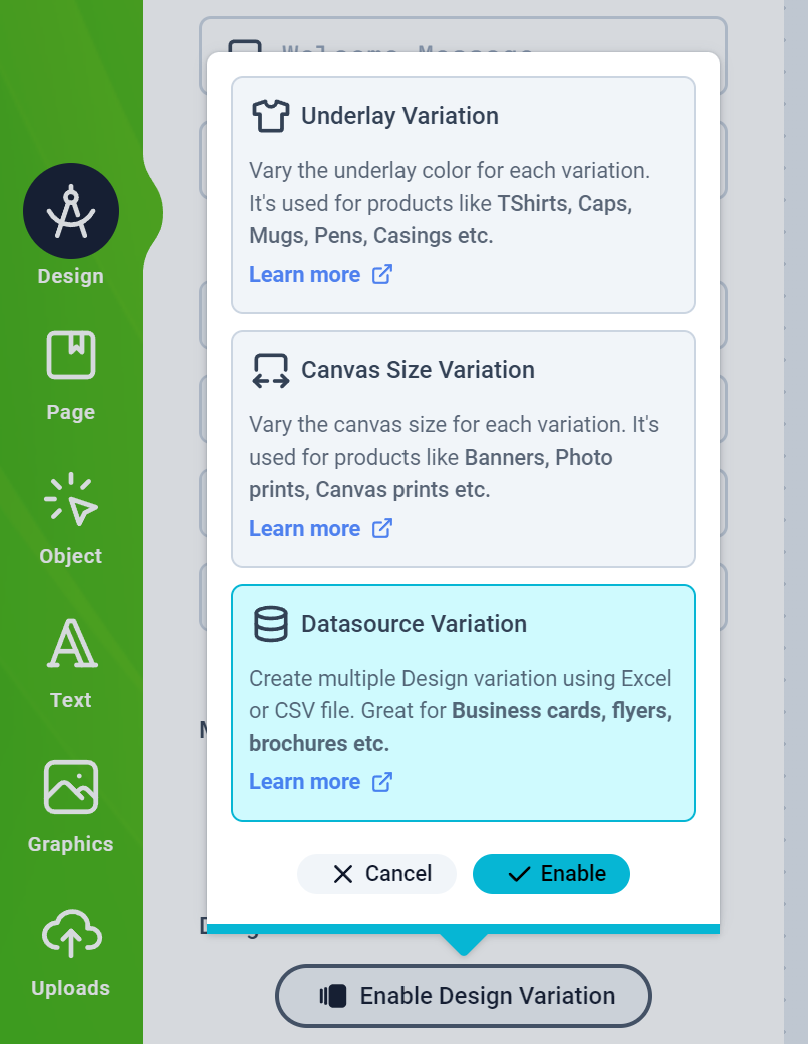
Click the Design tab on the left panel and then click the Enable Design Variation button to select the Datasource Variation and Enable it
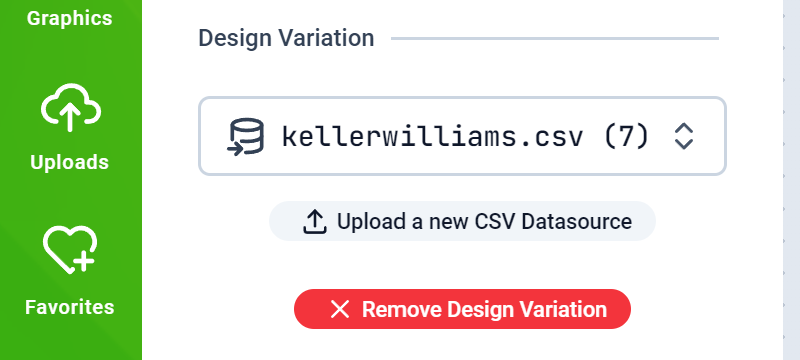
You should have the Datasource selection form displayed. Your previously uploaded CVS Files should appear here. If you don’t have any, you can upload one right here.
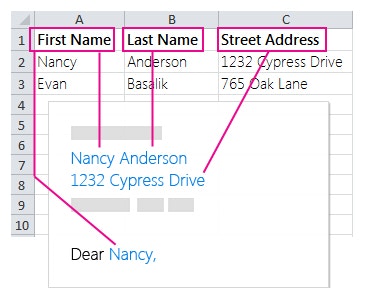
To drive your Design Object’s values with a Datasource, you need to have in the Design, Objects that have the same title as the column name of your CSV Datasource.For example, you create Smart Text Objects labelled First Name, Last Name and Street Address corresponding to the CSV file shown below:How to create Smart Objects
Save your Design and assign it to a product and test as a customer on your web store.
{"docsConfig":{"theme":"mint","$schema":"https://mintlify.com/docs.json","name":"Print.App Documentation","colors":{"primary":"#00AC13","light":"#00CD17","dark":"#008B10"},"logo":{"light":"https://mintcdn.com/printapp/8ZfPxlJeGBl6BLAD/logo/light.svg?fit=max\u0026auto=format\u0026n=8ZfPxlJeGBl6BLAD\u0026q=85\u0026s=f2dc8c61d71358f310658fb8b3756287","dark":"https://mintcdn.com/printapp/8ZfPxlJeGBl6BLAD/logo/dark.svg?fit=max\u0026auto=format\u0026n=8ZfPxlJeGBl6BLAD\u0026q=85\u0026s=74402b22cc2694c2d990b57771f9422c"},"favicon":"https://mintcdn.com/printapp/CwAEBcf61sfC7N4Y/favicon.svg?fit=max\u0026auto=format\u0026n=CwAEBcf61sfC7N4Y\u0026q=85\u0026s=cb170a7b273f77e0921c312176e48c99","navbar":{"links":[{"href":"https://discord.gg/XNdtdFxNdE","label":"Community"}],"primary":{"type":"button","label":"Dashboard","href":"https://admin.print.app"}},"footer":{"socials":{"twitter":"https://twitter.com/print_dot_app","instagram":"https://github.com/print_dot_app","github":"https://github.com/printapp","discord":"https://discord.gg/XNdtdFxNdE"}},"styling":{"latex":true},"navigation":{"pages":[]}},"deployment":{"deploymentMetadataValue":{"subdomain":"printapp","hasAudioNarration":false,"actualSubdomain":"printapp","customDomains":["print.app"],"gitSource":{"type":"github","owner":"printapp","repo":"documentation","deployBranch":"main","contentDirectory":"","isPrivate":false,"mountPath":"","label":"","_id":"6aee29ef3dd0f82bef4f9995"},"entitlements":{},"buildId":"6af702e5d091d1e54976cd62","clientVersion":"0.0.4143","searchFilterCounts":[{"language":"default","tag":"API References","count":112},{"language":"default","tag":"Endpoints","count":100},{"language":"default","tag":"Documentation","count":64},{"language":"default","tag":"Design Guides","count":64},{"language":"default","tag":"Designs","count":35},{"language":"default","tag":"Print Options","count":24},{"language":"default","tag":"Platforms","count":18},{"language":"default","tag":"Guides","count":12},{"language":"default","tag":"Gang Sheet Builder","count":12},{"language":"default","tag":"Configuration","count":8}],"searchSettings":{"fullPageSearch":true}},"assistantConfig":{},"basePath":"/docs","hasChatPermissions":false,"hasWebMcpPermissions":false,"toggles":[{"name":"kill-isr","enabled":true,"variant":{"name":"disabled","enabled":false,"feature_enabled":true},"impressionData":false},{"name":"custom-rbac-roles","enabled":true,"variant":{"name":"disabled","enabled":false,"feature_enabled":true},"impressionData":false},{"name":"agent-mintlify-slack","enabled":true,"variant":{"name":"disabled","enabled":false,"feature_enabled":true},"impressionData":false},{"name":"agent-integrations-settings","enabled":true,"variant":{"name":"disabled","enabled":false,"feature_enabled":true},"impressionData":false},{"name":"rbac-expansion","enabled":true,"variant":{"name":"disabled","enabled":false,"feature_enabled":true},"impressionData":false},{"name":"automations-pr-grouping","enabled":true,"variant":{"name":"disabled","enabled":false,"feature_enabled":true},"impressionData":false},{"name":"custom-prefix","enabled":true,"variant":{"name":"disabled","enabled":false,"feature_enabled":true},"impressionData":false},{"name":"analytics-v7","enabled":true,"variant":{"name":"disabled","enabled":false,"feature_enabled":true},"impressionData":false},{"name":"user-flows-analytics","enabled":true,"variant":{"name":"disabled","enabled":false,"feature_enabled":true},"impressionData":false},{"name":"no-publish-flow","enabled":true,"variant":{"name":"disabled","enabled":false,"feature_enabled":true},"impressionData":false},{"name":"workos-onboarding","enabled":true,"variant":{"name":"disabled","enabled":false,"feature_enabled":true},"impressionData":false},{"name":"snapshot-serving-live","enabled":true,"variant":{"name":"disabled","enabled":false,"feature_enabled":true},"impressionData":false},{"name":"stripTemperatureMiddleware","enabled":true,"variant":{"name":"disabled","enabled":false,"feature_enabled":true},"impressionData":false},{"name":"support-platform-pylon-zendesk","enabled":true,"variant":{"name":"disabled","enabled":false,"feature_enabled":true},"impressionData":false},{"name":"snapshot-serving","enabled":true,"variant":{"name":"disabled","enabled":false,"feature_enabled":true},"impressionData":false},{"name":"instant-rollback","enabled":true,"variant":{"name":"disabled","enabled":false,"feature_enabled":true},"impressionData":false},{"name":"granular-notifications-server","enabled":true,"variant":{"name":"disabled","enabled":false,"feature_enabled":true},"impressionData":false},{"name":"granular-notifications","enabled":true,"variant":{"name":"disabled","enabled":false,"feature_enabled":true},"impressionData":false},{"name":"automations-fable","enabled":true,"variant":{"name":"disabled","enabled":false,"feature_enabled":true},"impressionData":false},{"name":"fixed-ai-action-pricing","enabled":true,"variant":{"name":"disabled","enabled":false,"feature_enabled":true},"impressionData":false},{"name":"automation-resolve-merge-conflict","enabled":true,"variant":{"name":"disabled","enabled":false,"feature_enabled":true},"impressionData":false},{"name":"scoped-publishing","enabled":true,"variant":{"name":"disabled","enabled":false,"feature_enabled":true},"impressionData":false},{"name":"mintql","enabled":true,"variant":{"name":"disabled","enabled":false,"feature_enabled":true},"impressionData":false},{"name":"page-level-analytics","enabled":true,"variant":{"name":"disabled","enabled":false,"feature_enabled":true},"impressionData":false},{"name":"editor-version-history-v2","enabled":true,"variant":{"name":"disabled","enabled":false,"feature_enabled":true},"impressionData":false},{"name":"billing-page-v2","enabled":true,"variant":{"name":"disabled","enabled":false,"feature_enabled":true},"impressionData":false},{"name":"full-page-search","enabled":true,"variant":{"name":"disabled","enabled":false,"feature_enabled":true},"impressionData":false},{"name":"workspace-projects","enabled":true,"variant":{"name":"disabled","enabled":false,"feature_enabled":true},"impressionData":false},{"name":"assistant-v5","enabled":true,"variant":{"name":"disabled","enabled":false,"feature_enabled":true},"impressionData":false},{"name":"fork-pr-previews","enabled":true,"variant":{"name":"disabled","enabled":false,"feature_enabled":true},"impressionData":false},{"name":"revalidation-jwt","enabled":true,"variant":{"name":"disabled","enabled":false,"feature_enabled":true},"impressionData":false},{"name":"workos-sso-scim","enabled":true,"variant":{"name":"disabled","enabled":false,"feature_enabled":true},"impressionData":false},{"name":"hobby-abuse-scan","enabled":true,"variant":{"name":"disabled","enabled":false,"feature_enabled":true},"impressionData":false},{"name":"dashboard-inbox","enabled":true,"variant":{"name":"disabled","enabled":false,"feature_enabled":true},"impressionData":false},{"name":"workos-signup","enabled":true,"variant":{"name":"disabled","enabled":false,"feature_enabled":true},"impressionData":false},{"name":"turbopuffer-dual-write","enabled":true,"variant":{"name":"disabled","enabled":false,"feature_enabled":true},"impressionData":false},{"name":"workos-enabled","enabled":true,"variant":{"name":"disabled","enabled":false,"feature_enabled":true},"impressionData":false},{"name":"approve-review-flow","enabled":true,"variant":{"name":"disabled","enabled":false,"feature_enabled":true},"impressionData":false},{"name":"editor-metadata","enabled":true,"variant":{"name":"disabled","enabled":false,"feature_enabled":true},"impressionData":false},{"name":"sso-setup-deadline-banner","enabled":true,"variant":{"name":"disabled","enabled":false,"feature_enabled":true},"impressionData":false},{"name":"turbopuffer-serve","enabled":true,"variant":{"name":"disabled","enabled":false,"feature_enabled":true},"impressionData":false},{"name":"live-agents","enabled":true,"variant":{"name":"disabled","enabled":false,"feature_enabled":true},"impressionData":false},{"name":"llms-txt-v2","enabled":true,"variant":{"name":"disabled","enabled":false,"feature_enabled":true},"impressionData":false}],"googleFontsInlined":false},"customCss":[],"page":{"pagePath":"guides/designs/variations/variation-datasource","slug":"/guides/designs/variations/variation-datasource","pageMetadata":{"title":"CSV Datasource","description":"How to create and manage a design variation driven by a CSV or Excel sheet","href":"/guides/designs/variations/variation-datasource"},"description":{"compiledSource":"\"use strict\";\nconst {jsx: _jsx} = arguments[0];\nconst {useMDXComponents: _provideComponents} = arguments[0];\nfunction _createMdxContent(props) {\n const _components = {\n p: \"p\",\n ..._provideComponents(),\n ...props.components\n };\n return _jsx(_components.p, {\n children: \"How to create and manage a design variation driven by a CSV or Excel sheet\"\n });\n}\nfunction MDXContent(props = {}) {\n const {wrapper: MDXLayout} = {\n ..._provideComponents(),\n ...props.components\n };\n return MDXLayout ? _jsx(MDXLayout, {\n ...props,\n children: _jsx(_createMdxContent, {\n ...props\n })\n }) : _createMdxContent(props);\n}\nreturn {\n default: MDXContent\n};\n","frontmatter":{},"scope":{}},"pageType":"default","mdx":{"mdxSource":{"compiledSource":"\"use strict\";const{Fragment:_Fragment,jsx:_jsx,jsxs:_jsxs}=arguments[0];const{useMDXComponents:_provideComponents}=arguments[0];function _createMdxContent(props){const _components={a:`a`,code:`code`,li:`li`,p:`p`,ul:`ul`,..._provideComponents(),...props.components},{Heading,OptimizedImage,Tip}=_components;if(!Heading)_missingMdxReference(`Heading`,true);if(!OptimizedImage)_missingMdxReference(`OptimizedImage`,true);if(!Tip)_missingMdxReference(`Tip`,true);return _jsxs(_Fragment,{children:[_jsx(_components.p,{children:`A Design variation is a single design with additional variations.\nWe can create Design Variants using a simple CVS or Excel sheet to change the design contents. This will give us variants equal to the number of rows / records in the uploaded CSV.`}),`\n`,_jsx(Tip,{children:`You can use this to create different variants of a Business Card for different companies or store locations of the same company by using the CVS to update the address and other contact details of the companies`}),`\n`,_jsx(Heading,{level:`3`,id:`create-a-datasource-variation`,children:`Create a Datasource Variation`}),`\n`,_jsxs(_components.ul,{children:[`\n`,_jsxs(_components.li,{children:[`\n`,_jsxs(_components.p,{children:[`To get started, load a Design or open one for edit from your `,_jsx(_components.a,{href:`https://admin.print.app/designs`,children:`Admin Designs page`})]}),`\n`]}),`\n`,_jsxs(_components.li,{children:[`\n`,_jsx(_components.p,{children:`Click the Design tab on the left panel and then click the Enable Design Variation button to select the Datasource Variation and Enable it`}),`\n`,_jsx(OptimizedImage,{width:`320`,src:`https://mintcdn.com/printapp/ECKpksPfnecehQ8M/images/ds-variation.png?fit=max\u0026auto=format\u0026n=ECKpksPfnecehQ8M\u0026q=85\u0026s=e7928dc83963a5d5d9dee3a97286f500`,\"data-og-width\":`808`,\"data-og-height\":`1044`,\"data-path\":`images/ds-variation.png`,\"data-optimize\":`true`,\"data-opv\":`3`,srcset:`https://mintcdn.com/printapp/ECKpksPfnecehQ8M/images/ds-variation.png?w=280\u0026fit=max\u0026auto=format\u0026n=ECKpksPfnecehQ8M\u0026q=85\u0026s=7c88759b6e150c91e66551cc0c76ba71 280w, https://mintcdn.com/printapp/ECKpksPfnecehQ8M/images/ds-variation.png?w=560\u0026fit=max\u0026auto=format\u0026n=ECKpksPfnecehQ8M\u0026q=85\u0026s=1d555ab43c3927644cc184def0feeb65 560w, https://mintcdn.com/printapp/ECKpksPfnecehQ8M/images/ds-variation.png?w=840\u0026fit=max\u0026auto=format\u0026n=ECKpksPfnecehQ8M\u0026q=85\u0026s=165ee350f98fce1e19cb182ad2bfcf66 840w, https://mintcdn.com/printapp/ECKpksPfnecehQ8M/images/ds-variation.png?w=1100\u0026fit=max\u0026auto=format\u0026n=ECKpksPfnecehQ8M\u0026q=85\u0026s=5c4f80733ea4358913c935c406451ed9 1100w, https://mintcdn.com/printapp/ECKpksPfnecehQ8M/images/ds-variation.png?w=1650\u0026fit=max\u0026auto=format\u0026n=ECKpksPfnecehQ8M\u0026q=85\u0026s=8d8874b8fa6a788cf2ae9662f097f1f3 1650w, https://mintcdn.com/printapp/ECKpksPfnecehQ8M/images/ds-variation.png?w=2500\u0026fit=max\u0026auto=format\u0026n=ECKpksPfnecehQ8M\u0026q=85\u0026s=2e25791842e7f91c829e958794b95164 2500w`}),`\n`]}),`\n`,_jsxs(_components.li,{children:[`\n`,_jsx(_components.p,{children:`You should have the Datasource selection form displayed. Your previously uploaded CVS Files should appear here. If you don’t have any, you can upload one right here.`}),`\n`,_jsx(OptimizedImage,{width:`320`,src:`https://mintcdn.com/printapp/ECKpksPfnecehQ8M/images/ds-variation-form.png?fit=max\u0026auto=format\u0026n=ECKpksPfnecehQ8M\u0026q=85\u0026s=01ea822c956edb4d5a0ea09b18f488bc`,\"data-og-width\":`800`,\"data-og-height\":`360`,\"data-path\":`images/ds-variation-form.png`,\"data-optimize\":`true`,\"data-opv\":`3`,srcset:`https://mintcdn.com/printapp/ECKpksPfnecehQ8M/images/ds-variation-form.png?w=280\u0026fit=max\u0026auto=format\u0026n=ECKpksPfnecehQ8M\u0026q=85\u0026s=24dd58451f021daa157febdb394c4631 280w, https://mintcdn.com/printapp/ECKpksPfnecehQ8M/images/ds-variation-form.png?w=560\u0026fit=max\u0026auto=format\u0026n=ECKpksPfnecehQ8M\u0026q=85\u0026s=85d73d856a2b565c4ad788f4710423bd 560w, https://mintcdn.com/printapp/ECKpksPfnecehQ8M/images/ds-variation-form.png?w=840\u0026fit=max\u0026auto=format\u0026n=ECKpksPfnecehQ8M\u0026q=85\u0026s=896f21adbddc946ba1870e115c498db5 840w, https://mintcdn.com/printapp/ECKpksPfnecehQ8M/images/ds-variation-form.png?w=1100\u0026fit=max\u0026auto=format\u0026n=ECKpksPfnecehQ8M\u0026q=85\u0026s=66896f2da36ac8a860e6bc575cd2928d 1100w, https://mintcdn.com/printapp/ECKpksPfnecehQ8M/images/ds-variation-form.png?w=1650\u0026fit=max\u0026auto=format\u0026n=ECKpksPfnecehQ8M\u0026q=85\u0026s=a80f0af058c381acfc61bbea9a42678f 1650w, https://mintcdn.com/printapp/ECKpksPfnecehQ8M/images/ds-variation-form.png?w=2500\u0026fit=max\u0026auto=format\u0026n=ECKpksPfnecehQ8M\u0026q=85\u0026s=e11d8d82db8190307f2621597e72d692 2500w`}),`\n`]}),`\n`,_jsxs(_components.li,{children:[`\n`,_jsx(_components.p,{children:`To drive your Design Object’s values with a Datasource, you need to have in the Design, Objects that have the same title as the column name of your CSV Datasource.`}),`\n`,_jsxs(_components.p,{children:[`For example, you create Smart Text Objects labelled `,_jsx(_components.code,{children:`First Name`}),`, `,_jsx(_components.code,{children:`Last Name`}),` and `,_jsx(_components.code,{children:`Street Address`}),` corresponding to the CSV file shown below:`]}),`\n`,_jsx(OptimizedImage,{width:`320`,src:`https://mintcdn.com/printapp/ECKpksPfnecehQ8M/images/ds-sample.jpg?fit=max\u0026auto=format\u0026n=ECKpksPfnecehQ8M\u0026q=85\u0026s=70abee0f45b551315dde5d3ce1544d04`,\"data-og-width\":`365`,\"data-og-height\":`300`,\"data-path\":`images/ds-sample.jpg`,\"data-optimize\":`true`,\"data-opv\":`3`,srcset:`https://mintcdn.com/printapp/ECKpksPfnecehQ8M/images/ds-sample.jpg?w=280\u0026fit=max\u0026auto=format\u0026n=ECKpksPfnecehQ8M\u0026q=85\u0026s=adb2edd9bbf39eded9f667e8da3ae730 280w, https://mintcdn.com/printapp/ECKpksPfnecehQ8M/images/ds-sample.jpg?w=560\u0026fit=max\u0026auto=format\u0026n=ECKpksPfnecehQ8M\u0026q=85\u0026s=2cfcbfe9b244f277590dd9806a7c0811 560w, https://mintcdn.com/printapp/ECKpksPfnecehQ8M/images/ds-sample.jpg?w=840\u0026fit=max\u0026auto=format\u0026n=ECKpksPfnecehQ8M\u0026q=85\u0026s=23c59a77002f376f8e458daa077d9de7 840w, https://mintcdn.com/printapp/ECKpksPfnecehQ8M/images/ds-sample.jpg?w=1100\u0026fit=max\u0026auto=format\u0026n=ECKpksPfnecehQ8M\u0026q=85\u0026s=7849bfccb9bc992389b4895910057636 1100w, https://mintcdn.com/printapp/ECKpksPfnecehQ8M/images/ds-sample.jpg?w=1650\u0026fit=max\u0026auto=format\u0026n=ECKpksPfnecehQ8M\u0026q=85\u0026s=bf4d3a2cf3e6272859df139db2fe8343 1650w, https://mintcdn.com/printapp/ECKpksPfnecehQ8M/images/ds-sample.jpg?w=2500\u0026fit=max\u0026auto=format\u0026n=ECKpksPfnecehQ8M\u0026q=85\u0026s=77b94ccc7e0b4115dfff8731a8d22dc1 2500w`}),`\n`,_jsx(_components.p,{children:_jsx(_components.a,{href:`/guides/designs/objects/smart`,children:`How to create Smart Objects`})}),`\n`]}),`\n`,_jsxs(_components.li,{children:[`\n`,_jsx(_components.p,{children:`Save your Design and assign it to a product and test as a customer on your web store.`}),`\n`]}),`\n`]}),`\n`,_jsxs(Tip,{children:[`You can manage all your CVS Datasources in `,_jsx(_components.a,{href:`https://admin.print.app/designs`,children:`Admin > Designs`})]})]})}function MDXContent(props={}){const{wrapper:MDXLayout}={..._provideComponents(),...props.components};return MDXLayout?_jsx(MDXLayout,{...props,children:_jsx(_createMdxContent,{...props})}):_createMdxContent(props)}return{default:MDXContent};function _missingMdxReference(id,component){throw new Error(`Expected `+(component?`component`:`object`)+\" `\"+id+\"` to be defined: you likely forgot to import, pass, or provide it.\")}","frontmatter":{},"scope":{"config":{},"pageMetadata":{"title":"CSV Datasource","description":"How to create and manage a design variation driven by a CSV or Excel sheet","href":"/guides/designs/variations/variation-datasource"}}},"mdxSourceWithNoJs":null},"mdxExtracts":{"tableOfContents":[{"title":"Create a Datasource Variation","slug":"create-a-datasource-variation","depth":3,"children":[]}],"codeExamples":{}},"jsLinks":["/docs/_mintlify/custom/printapp/5668d2dd18a12f25/ga-consent.js"],"subdomain":"printapp","siteName":"Print.App Documentation","title":"CSV Datasource - Print.App Documentation","navMaps":{"firstHrefInVersion":{},"firstHrefInLanguage":{}},"lastModified":"2026-09-22T18:04:49.912Z","originalFileLocation":"guides/designs/variations/variation-datasource.mdx"},"headHtml":"\u003cscript data-mint-head>(function(){var d=document.documentElement,p=null;if(!p){try{p=localStorage.getItem(\"isDarkMode\")}catch(e){}if(p==='true')p='dark';else if(p==='false')p='light';if(p!=='light'\u0026\u0026p!=='dark'\u0026\u0026p!=='system')p=\"system\"}var r=p==='system'?(matchMedia(\"(prefers-color-scheme: dark)\").matches?'dark':'light'):p;d.classList.remove(r==='dark'?'light':'dark');d.classList.add(r);d.setAttribute(\"data-theme-preference\",p)})();\u003c/script>\u003cmeta data-mint-head name=\"description\" content=\"How to create and manage a design variation driven by a CSV or Excel sheet\">\u003cmeta data-mint-head name=\"application-name\" content=\"Print.App Documentation\">\u003cmeta data-mint-head name=\"generator\" content=\"Mintlify\">\u003clink data-mint-head rel=\"icon\" type=\"image/png\" sizes=\"192x192\" href=\"/docs/mintlify-assets/_mintlify/favicons/printapp/QZ41IcGsgV91EEVQ/_generated/favicon/android-chrome-192x192.png\" media=\"(prefers-color-scheme: light)\">\u003clink data-mint-head rel=\"apple-touch-icon\" type=\"image/png\" sizes=\"180x180\" href=\"/docs/mintlify-assets/_mintlify/favicons/printapp/QZ41IcGsgV91EEVQ/_generated/favicon/apple-touch-icon.png\">\u003clink data-mint-head rel=\"icon\" type=\"image/png\" sizes=\"16x16\" href=\"/docs/mintlify-assets/_mintlify/favicons/printapp/QZ41IcGsgV91EEVQ/_generated/favicon/favicon-16x16.png\" media=\"(prefers-color-scheme: light)\">\u003clink data-mint-head rel=\"icon\" type=\"image/png\" sizes=\"32x32\" href=\"/docs/mintlify-assets/_mintlify/favicons/printapp/QZ41IcGsgV91EEVQ/_generated/favicon/favicon-32x32.png\" media=\"(prefers-color-scheme: light)\">\u003clink data-mint-head rel=\"shortcut icon\" type=\"image/x-icon\" href=\"/docs/mintlify-assets/_mintlify/favicons/printapp/QZ41IcGsgV91EEVQ/_generated/favicon/favicon.ico\" media=\"(prefers-color-scheme: light)\">\u003clink data-mint-head rel=\"icon\" type=\"image/png\" sizes=\"192x192\" href=\"/docs/mintlify-assets/_mintlify/favicons/printapp/QZ41IcGsgV91EEVQ/_generated/favicon-dark/android-chrome-192x192.png\" media=\"(prefers-color-scheme: dark)\">\u003clink data-mint-head rel=\"icon\" type=\"image/png\" sizes=\"16x16\" href=\"/docs/mintlify-assets/_mintlify/favicons/printapp/QZ41IcGsgV91EEVQ/_generated/favicon-dark/favicon-16x16.png\" media=\"(prefers-color-scheme: dark)\">\u003clink data-mint-head rel=\"icon\" type=\"image/png\" sizes=\"32x32\" href=\"/docs/mintlify-assets/_mintlify/favicons/printapp/QZ41IcGsgV91EEVQ/_generated/favicon-dark/favicon-32x32.png\" media=\"(prefers-color-scheme: dark)\">\u003clink data-mint-head rel=\"shortcut icon\" type=\"image/x-icon\" href=\"/docs/mintlify-assets/_mintlify/favicons/printapp/QZ41IcGsgV91EEVQ/_generated/favicon-dark/favicon.ico\" media=\"(prefers-color-scheme: dark)\">\u003cmeta data-mint-head property=\"og:title\" content=\"CSV Datasource - Print.App Documentation\">\u003cmeta data-mint-head property=\"og:description\" content=\"How to create and manage a design variation driven by a CSV or Excel sheet\">\u003cmeta data-mint-head property=\"og:site_name\" content=\"Print.App Documentation\">\u003cmeta data-mint-head property=\"og:url\" content=\"https://print.app/docs/guides/designs/variations/variation-datasource\">\u003cmeta data-mint-head property=\"og:type\" content=\"website\">\u003cmeta data-mint-head property=\"og:image\" content=\"https://printapp.mintlify.site/docs/_mintlify/api/og/v2?division=Variations\u0026amp;title=CSV+Datasource\u0026amp;description=How+to+create+and+manage+a+design+variation+driven+by+a+CSV+or+Excel+sheet\u0026amp;theme=634763f1f287d389464516ed\u0026amp;signature=2f93ab07deb6d32c4c4454990cd14711347da13e8614e8366595b559f2cafea7\">\u003cmeta data-mint-head property=\"og:image:width\" content=\"1200\">\u003cmeta data-mint-head property=\"og:image:height\" content=\"630\">\u003cmeta data-mint-head name=\"twitter:card\" content=\"summary_large_image\">\u003cmeta data-mint-head name=\"twitter:title\" content=\"CSV Datasource - Print.App Documentation\">\u003cmeta data-mint-head name=\"twitter:description\" content=\"How to create and manage a design variation driven by a CSV or Excel sheet\">\u003cmeta data-mint-head name=\"twitter:image\" content=\"https://printapp.mintlify.site/docs/_mintlify/api/og/v2?division=Variations\u0026amp;title=CSV+Datasource\u0026amp;description=How+to+create+and+manage+a+design+variation+driven+by+a+CSV+or+Excel+sheet\u0026amp;theme=634763f1f287d389464516ed\u0026amp;signature=2f93ab07deb6d32c4c4454990cd14711347da13e8614e8366595b559f2cafea7\">\u003cmeta data-mint-head name=\"twitter:image:width\" content=\"1200\">\u003cmeta data-mint-head name=\"twitter:image:height\" content=\"630\">\u003cmeta data-mint-head name=\"msapplication-config\" content=\"/docs/mintlify-assets/_mintlify/favicons/printapp/QZ41IcGsgV91EEVQ/_generated/favicon/browserconfig.xml\">\u003cmeta data-mint-head name=\"apple-mobile-web-app-title\" content=\"Print.App Documentation\">\u003cmeta data-mint-head name=\"msapplication-TileColor\" content=\"#00AC13\">\u003clink data-mint-head rel=\"canonical\" href=\"https://print.app/docs/guides/designs/variations/variation-datasource\">\u003clink data-mint-head rel=\"alternate\" type=\"application/xml\" href=\"/docs/sitemap.xml\">\u003clink data-mint-head rel=\"alternate\" type=\"text/markdown\" href=\"/docs/guides/designs/variations/variation-datasource.md\">\u003cscript data-mint-head type=\"application/ld+json\">{\"@context\":\"https://schema.org\",\"@graph\":[{\"@type\":\"Organization\",\"@id\":\"https://print.app/#organization\",\"name\":\"Print.App Documentation\",\"url\":\"https://print.app\",\"logo\":{\"@type\":\"ImageObject\",\"url\":\"https://mintcdn.com/printapp/8ZfPxlJeGBl6BLAD/logo/light.svg?fit=max\u0026auto=format\u0026n=8ZfPxlJeGBl6BLAD\u0026q=85\u0026s=f2dc8c61d71358f310658fb8b3756287\"}},{\"@type\":\"WebSite\",\"@id\":\"https://print.app/docs#website\",\"name\":\"Print.App Documentation\",\"url\":\"https://print.app/docs\",\"publisher\":{\"@id\":\"https://print.app/#organization\"}},{\"@type\":\"WebPage\",\"@id\":\"https://print.app/docs/guides/designs/variations/variation-datasource#webpage\",\"url\":\"https://print.app/docs/guides/designs/variations/variation-datasource\",\"name\":\"CSV Datasource\",\"description\":\"How to create and manage a design variation driven by a CSV or Excel sheet\",\"dateModified\":\"2026-09-22T18:04:49.912Z\",\"isPartOf\":{\"@id\":\"https://print.app/docs#website\"},\"breadcrumb\":{\"@id\":\"https://print.app/docs/guides/designs/variations/variation-datasource#breadcrumb\"}},{\"@type\":\"BreadcrumbList\",\"@id\":\"https://print.app/docs/guides/designs/variations/variation-datasource#breadcrumb\",\"itemListElement\":[{\"@type\":\"ListItem\",\"position\":1,\"name\":\"Design Guides\",\"item\":\"https://print.app/docs/guides/designs/about-designs\"},{\"@type\":\"ListItem\",\"position\":2,\"name\":\"Designs\",\"item\":\"https://print.app/docs/guides/designs/about-designs\"},{\"@type\":\"ListItem\",\"position\":3,\"name\":\"Variations\",\"item\":\"https://print.app/docs/guides/designs/variations/variation-underlay\"},{\"@type\":\"ListItem\",\"position\":4,\"name\":\"CSV Datasource\",\"item\":\"https://print.app/docs/guides/designs/variations/variation-datasource\"}]},{\"@type\":[\"Article\",\"TechArticle\"],\"@id\":\"https://print.app/docs/guides/designs/variations/variation-datasource#article\",\"headline\":\"CSV Datasource\",\"name\":\"CSV Datasource\",\"description\":\"How to create and manage a design variation driven by a CSV or Excel sheet\",\"url\":\"https://print.app/docs/guides/designs/variations/variation-datasource\",\"mainEntityOfPage\":{\"@id\":\"https://print.app/docs/guides/designs/variations/variation-datasource#webpage\"},\"dateModified\":\"2026-09-22T18:04:49.912Z\",\"publisher\":{\"@id\":\"https://print.app/#organization\"},\"isPartOf\":{\"@id\":\"https://print.app/docs#website\"}}]}\u003c/script>\u003cscript data-mint-head type=\"application/ld+json\">{\"@context\":\"https://schema.org\",\"@type\":\"WebSite\",\"name\":\"Print.App Documentation\",\"publisher\":{\"@type\":\"Organization\",\"name\":\"Print.App Documentation\"},\"provider\":{\"@type\":\"Organization\",\"name\":\"Mintlify\",\"url\":\"https://mintlify.com\"}}\u003c/script>","agentPointerHref":"/docs/guides/designs/variations/variation-datasource.md","siteName":"Print.App Documentation","nav":{"global":null,"tabs":[{"tab":"Documentation","pages":[{"title":"Documentation","href":"/introduction"}]},{"tab":"Design Guides","groups":[{"group":"Design Guides","pages":[{"group":"Designs","pages":[{"title":"What is a Print.App Design?","href":"/guides/designs/about-designs"},{"title":"How to create Design","href":"/guides/designs/create-a-design"},{"title":"Design Settings","href":"/guides/designs/design-settings"},{"title":"Pages","href":"/guides/designs/design-pages"},{"title":"3D Scenes","href":"/guides/designs/3d-scenes"},{"group":"Canvas Objects","pages":[{"title":"Object Settings","href":"/guides/designs/objects/settings"},{"title":"Object Presets","href":"/guides/designs/objects/presets"},{"title":"Clipping Masks","href":"/guides/designs/objects/clipping-masks"},{"title":"Smart Objects","href":"/guides/designs/objects/smart"},{"title":"QRCode","href":"/guides/designs/objects/qrcode"},{"title":"Patterns","href":"/guides/designs/objects/patterns"}]},{"group":"Variations","pages":[{"title":"Underlay Colors","href":"/guides/designs/variations/variation-underlay"},{"title":"Canvas Size","description":"How to create and manage a design variation with different canvas sizes","href":"/guides/designs/variations/variation-canvassize"},{"title":"CSV Datasource","href":"/guides/designs/variations/variation-datasource"}]},{"group":"Modules","pages":[{"title":"Stickers Generator","description":"How to use the Stickers Generator module in Print app","href":"/guides/designs/modules/stickers"},{"title":"Page Selector","href":"/guides/designs/modules/page-selector"},{"title":"Logo Pattern Builder","href":"/guides/designs/modules/pattern"},{"title":"Calendar","href":"/guides/designs/modules/calendar"},{"title":"Mail Merge","href":"/guides/designs/modules/mail-merge"},{"title":"Photo Print Module","href":"/guides/designs/modules/photos-module"}]},{"title":"PDF Print Layers","href":"/guides/designs/pdf-layers"},{"title":"Importing Designs","href":"/guides/designs/import-designs"}]},{"title":"PDF Output Profiles","href":"/guides/projects/pdf-output-profiles"},{"title":"Imposition Rules","href":"/guides/projects/imposition-rules"},{"title":"Soft Color Proofing","href":"/guides/projects/color-proofing"},{"title":"How to Allocate Resources to Designs","href":"/guides/designs/assign-resources"}]},{"group":"Resources","pages":[{"group":"Colors","pages":[{"title":"Colors","href":"/guides/resources/colors/all-about-colors"},{"title":"ICC Color Profiles","href":"/guides/resources/colors/ICC-Profiles"},{"title":"Import Pantone \u0026 HKS Colors","href":"/guides/resources/colors/import-colors-Pantone-HKS"}]},{"title":"Texts and Fonts","href":"/guides/resources/text-and-fonts"},{"title":"Graphics and File Uploads","href":"/guides/resources/graphics"}]},{"group":"Print Solutions","pages":[{"title":"Printable Calendars","href":"/guides/solutions/calendars"},{"title":"Stationery Products","href":"/guides/solutions/stationeries"},{"title":"Garment Printing","href":"/guides/solutions/garment-printing"},{"title":"Photo Prints","href":"/guides/solutions/photo-prints"},{"title":"Banners \u0026 Large Prints","href":"/guides/solutions/banner-large-prints"},{"title":"Promotional Items","href":"/guides/solutions/promotional-items"},{"title":"Cut \u0026 Contour Lines","href":"/guides/solutions/cut-and-contour-lines"}]}]},{"tab":"API References","pages":[{"title":"API References","href":"/api-reference/v2/introduction"}]}]},"basePath":"","title":"CSV Datasource - Print.App Documentation","buildId":"dpl_Aw98ji4XvBsgtZwL1VrkUF9ehFqz","deploymentId":"dpl_Aw98ji4XvBsgtZwL1VrkUF9ehFqz","dynamics":["a74be98ba7"],"chunks":["zoom-image-lightbox-DsiWwPWR.js","lightbox-handle-r17bVUz3.js"]}