> ## Documentation Index
> Fetch the complete documentation index at: https://print.app/docs/llms.txt
> Use this file to discover all available pages before exploring further.
# Page Selector
> How to set a Design to enable your users add pages while designing
This is an essential module used to create stationery designs where the customer determines the final number of pages.
Products like **Funeral programmes, Restaurant Menus, Flyers** etc. utilize this module to give users ability to fit their contents into as many pages as desired
### How to enable a Page Selector module
* To get started, load a Design or open one for edit from your [Admin Designs page](https://admin.print.app/designs)
* Click the Design tab on the left panel and then click the `Add a Module` button and click Page Selector from the list.
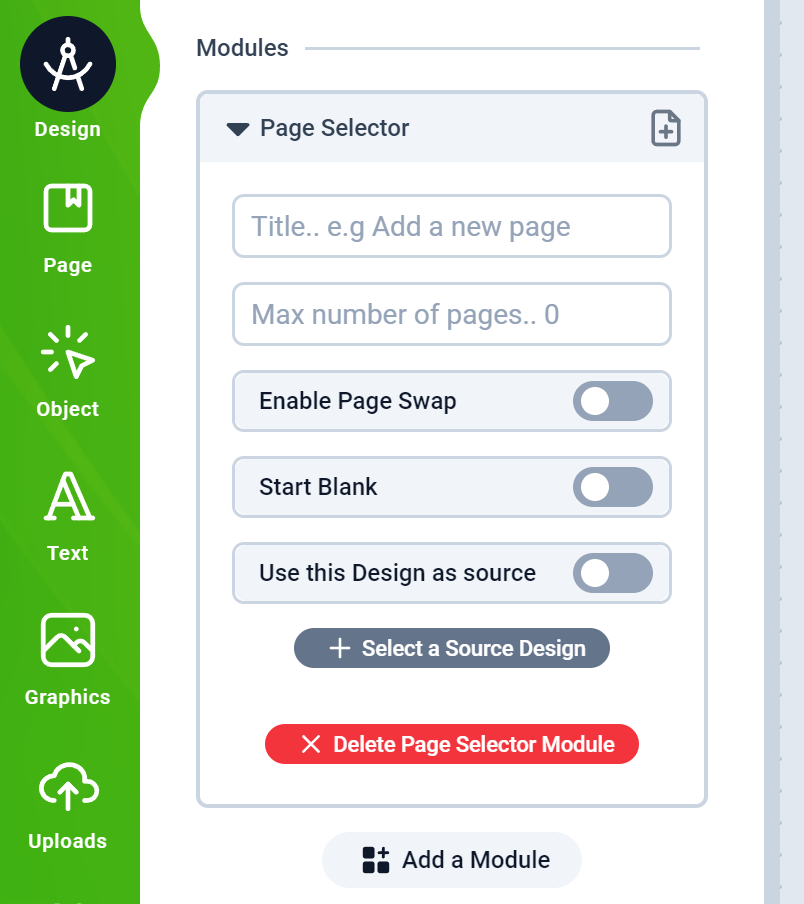 * Next, you will see the Page Selector configuration form as shown below:
* Cap the maximum number of pages by providing a limit number or leave blank for as many as the customer wishes to add.
* Enabling Page Swap means the customer can swap pages
* Start Blank will delete the current Design's starting page and allow the customer to start by adding a page
* You can use the current Design as page source or select an external Source Design from where the pages will be fetched.
* If you select the current Design as the pages source, `Required pages` is used to filter the pages that are loaded into the design by default, while the rest are available for the customer to add as they go along.
* Save your Design and assign it to a product and test as a customer on your web store.
* Next, you will see the Page Selector configuration form as shown below:
* Cap the maximum number of pages by providing a limit number or leave blank for as many as the customer wishes to add.
* Enabling Page Swap means the customer can swap pages
* Start Blank will delete the current Design's starting page and allow the customer to start by adding a page
* You can use the current Design as page source or select an external Source Design from where the pages will be fetched.
* If you select the current Design as the pages source, `Required pages` is used to filter the pages that are loaded into the design by default, while the rest are available for the customer to add as they go along.
* Save your Design and assign it to a product and test as a customer on your web store.