> ## Documentation Index
> Fetch the complete documentation index at: https://print.app/docs/llms.txt
> Use this file to discover all available pages before exploring further.
# What is the Gang Sheet Builder
> Let customers fill a roll of DTF film with their own transfers: upload, size, quantity, auto-nesting, a resolution gate and a print-ready sheet — priced by the film length used, on your store.
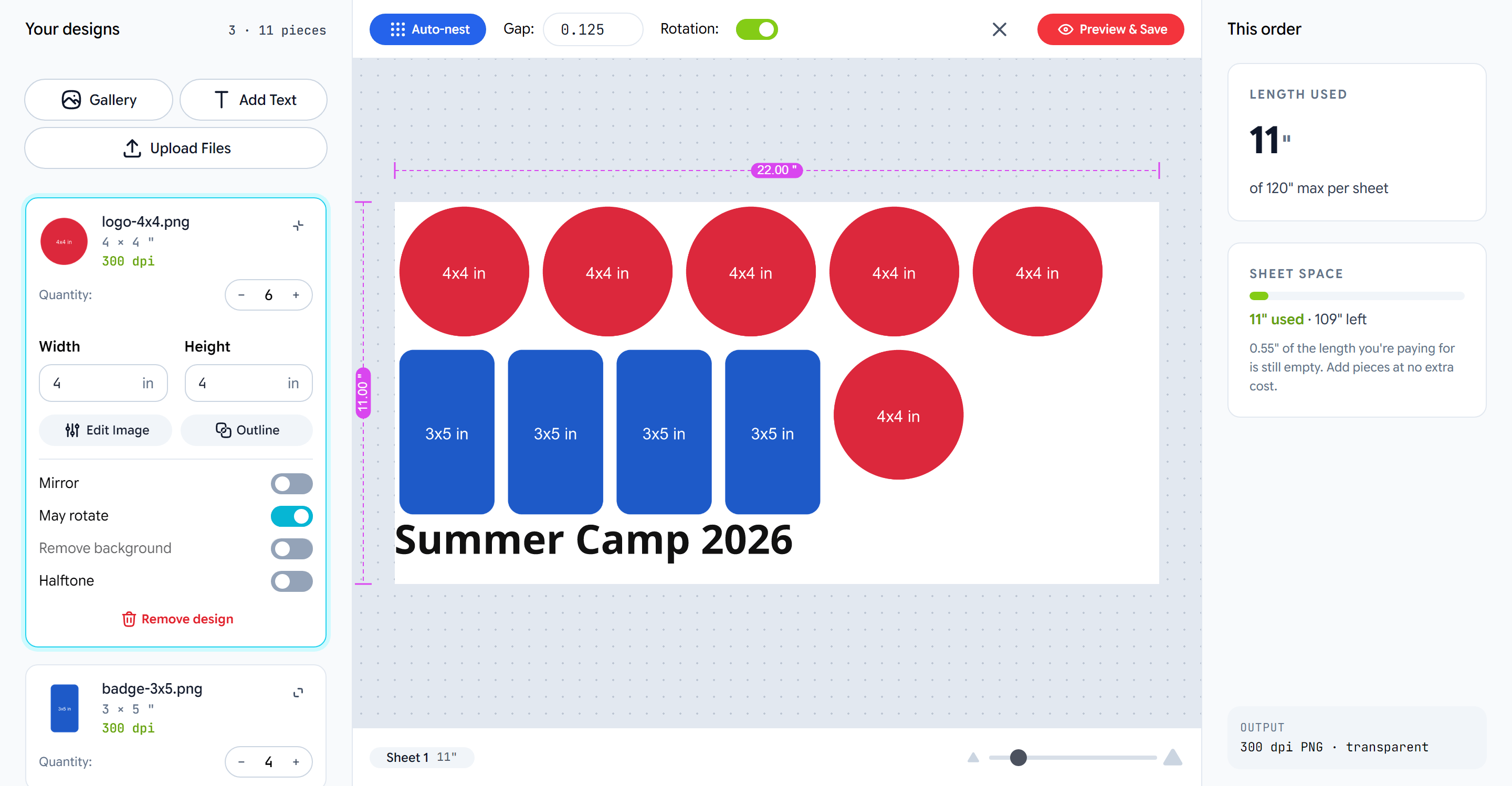 A **gang sheet** is one length of transfer film carrying many unrelated
designs, packed as tightly as they will go. Shops sell it by the length of
film used; customers fill it with whatever they need pressed. The Gang
Sheet Builder is that experience inside Print.App: a purpose-built editor
where customers upload their designs, say how big and how many, and get a
packed, print-ready sheet without ever touching a canvas tool.
It is a **design type**, like a regular design but with no pages of its
own. You create it in the dashboard, set the film and the rules, assign it
to a product, and the builder opens in place of the studio.
## What customers do
Upload files, add text in your fonts, or pick from your graphics
library. Each design becomes a row in a list.
Width, height and copies per design. The builder checks the print
resolution as they type and tells them the largest size that
still passes.
Every change re-packs the sheet automatically, rotating pieces to
save film when allowed. The summary shows the length used and how
much of the paid length is still free.
The sheet saves as a project, the store prices the length, and the
shop receives a print-ready PDF or PNG with a transparent
background.
## What it does
A server-side packer places every copy with your gap and edge
rules, rotation optional, and validates the layout before checkout.
Pixels over inches, checked live. Below your floor the design is
flagged with the size that would pass, and checkout can be blocked.
Text, gallery graphics, crop and adjust, background removal,
halftone and keyline outlines — each a switch on the design.
The builder measures the film; your store sets the rate — through
Print Options with length tiers, or a plain theme input.
## Two modes
* **Gang sheet** — the customer builds the sheet and pays for the film
length. The market's standard product.
* **Transfers by size** — the customer sets a print size and copy count
per design and pays by print area with copy breaks; the shop nests the
transfers behind the scenes. The same design, a different mode.
## What the shop receives
A project with one page per sheet, sized to the film width and the billed
length, with every design placed from its original file at native
resolution, text and SVG graphics as vectors, and a transparent
background. Output as PDF or a 300 dpi PNG. See
[Output and production](/docs/gangsheet/output).
The Gang Sheet Builder runs on the new PrintFx editor. Turn on **Switch
to new Editor** in your dashboard settings before creating one.
## Where to go next
Create the design, wire the pricing, place a test order.
Every setting on the panel and what it changes.
The three ways to price a sheet, with numbers.
What customers see, step by step.
A **gang sheet** is one length of transfer film carrying many unrelated
designs, packed as tightly as they will go. Shops sell it by the length of
film used; customers fill it with whatever they need pressed. The Gang
Sheet Builder is that experience inside Print.App: a purpose-built editor
where customers upload their designs, say how big and how many, and get a
packed, print-ready sheet without ever touching a canvas tool.
It is a **design type**, like a regular design but with no pages of its
own. You create it in the dashboard, set the film and the rules, assign it
to a product, and the builder opens in place of the studio.
## What customers do
Upload files, add text in your fonts, or pick from your graphics
library. Each design becomes a row in a list.
Width, height and copies per design. The builder checks the print
resolution as they type and tells them the largest size that
still passes.
Every change re-packs the sheet automatically, rotating pieces to
save film when allowed. The summary shows the length used and how
much of the paid length is still free.
The sheet saves as a project, the store prices the length, and the
shop receives a print-ready PDF or PNG with a transparent
background.
## What it does
A server-side packer places every copy with your gap and edge
rules, rotation optional, and validates the layout before checkout.
Pixels over inches, checked live. Below your floor the design is
flagged with the size that would pass, and checkout can be blocked.
Text, gallery graphics, crop and adjust, background removal,
halftone and keyline outlines — each a switch on the design.
The builder measures the film; your store sets the rate — through
Print Options with length tiers, or a plain theme input.
## Two modes
* **Gang sheet** — the customer builds the sheet and pays for the film
length. The market's standard product.
* **Transfers by size** — the customer sets a print size and copy count
per design and pays by print area with copy breaks; the shop nests the
transfers behind the scenes. The same design, a different mode.
## What the shop receives
A project with one page per sheet, sized to the film width and the billed
length, with every design placed from its original file at native
resolution, text and SVG graphics as vectors, and a transparent
background. Output as PDF or a 300 dpi PNG. See
[Output and production](/docs/gangsheet/output).
The Gang Sheet Builder runs on the new PrintFx editor. Turn on **Switch
to new Editor** in your dashboard settings before creating one.
## Where to go next
Create the design, wire the pricing, place a test order.
Every setting on the panel and what it changes.
The three ways to price a sheet, with numbers.
What customers see, step by step.